Help needed. Maybe unusual set up?

1. The problem I’m having:

I am not familiar with network set ups and don’t really know where to start!
As you can see from the Caddyfile I have tried a few things but not really understanding what I am doing!
This is what I have so far:

  • I have registered a domain
  • pifei.co.uk
    
  • ``` with my hosting provider (Hostinger)
    
  • I have a duckdns account and registered
  • ```pifei.duckdns.org```
    This is what I am trying to achieve:
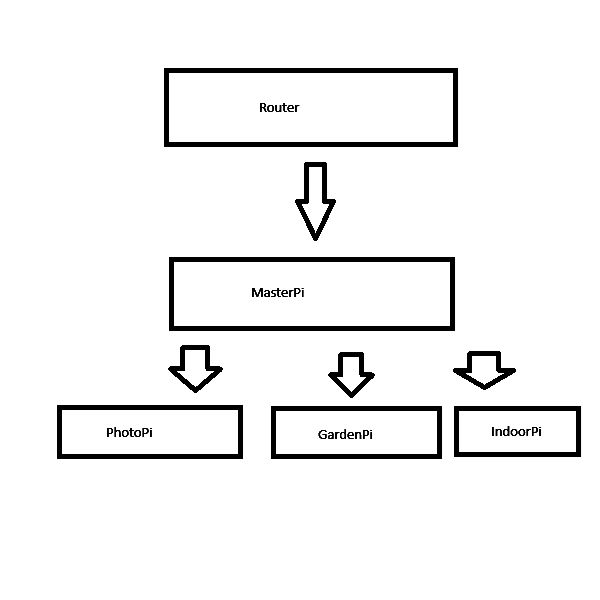
    I have a few raspberry pies. I would like to use one (pifei) as a central contact where I could direct traffic to the other pies (let’s call them ‘photos’, ‘indoor’ and ‘garden’) on the network They would all be subdomains of pifei.co.uk. The three pies would not need to see each other, but would all need to be accesssible from the outside world AND be https!!
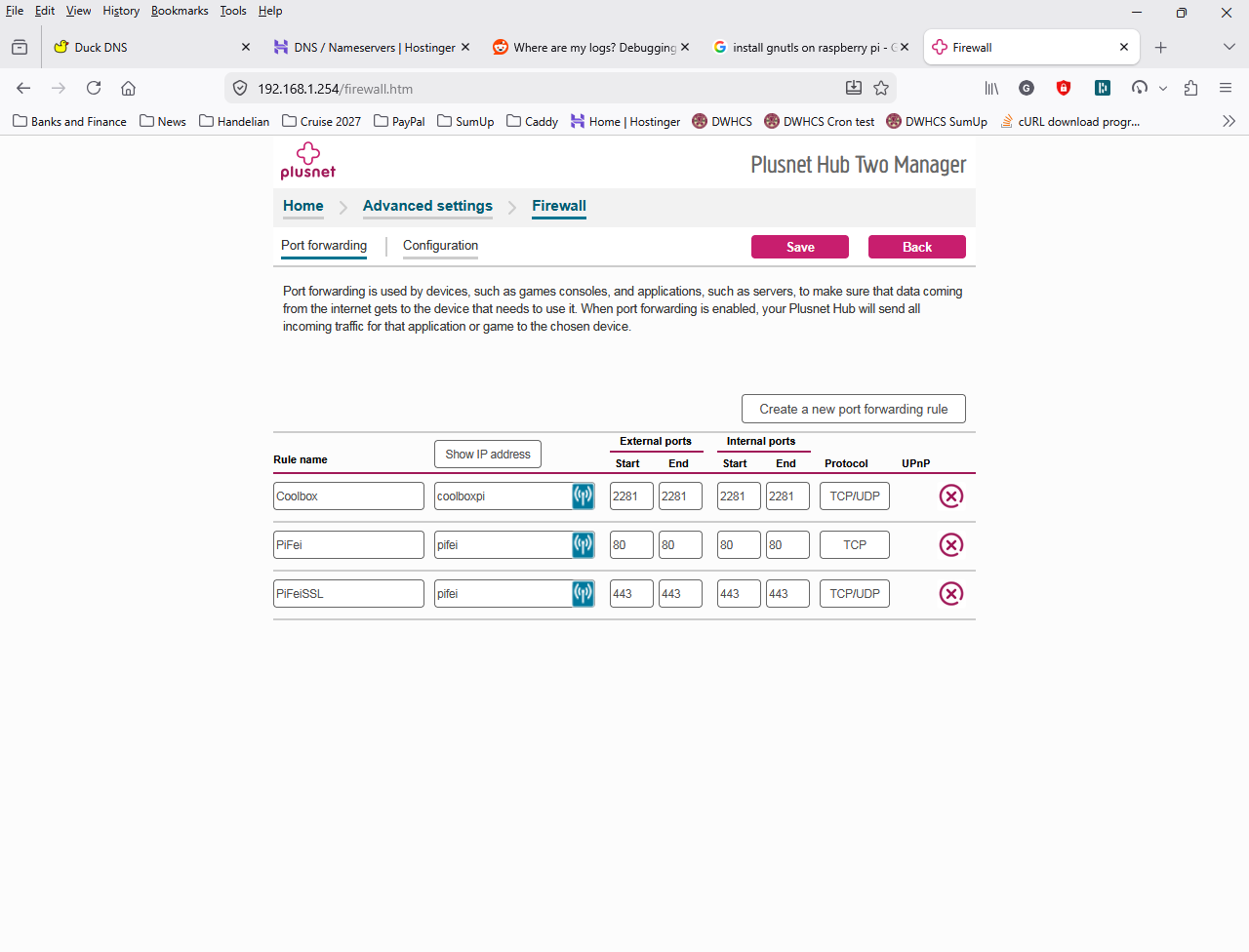
    I have managed to open ports 80 and 443 and point
  • photos.pifei.co.uk
    
  • ``` to it, but then I am stuck because no other subdomain can use these ports AND that is where I would need caddy to come to the rescue!!
    Hope this is clear and someone can help in plain, simple terms.
    

2. Error messages and/or full log output:

PASTE OVER THIS, BETWEEN THE ``` LINES.
Please use the preview pane to ensure it looks nice.

3. Caddy version:

4. How I installed and ran Caddy:

Installed with the help of

```
cd ~
sudo apt install -y debian-keyring debian-archive-keyring apt-transport-https
curl -1sLf 'https://dl.cloudsmith.io/public/caddy/stable/gpg.key' | sudo tee /etc/apt/trusted.gpg.d/caddy-stable.asc
curl -1sLf 'https://dl.cloudsmith.io/public/caddy/stable/debian.deb.txt' | sudo tee /etc/apt/sources.list.d/caddy-stable.list
sudo apt update
sudo apt install caddy
```

a. System environment:

Raspberry pi model b plus
Raspbian Trixie
Debian version full 13.1

b. Command:

```sudo nano /etc/caddy/Caddyfile
```

c. Service/unit/compose file:

PASTE OVER THIS, BETWEEN THE ``` LINES.
Please use the preview pane to ensure it looks nice.

d. My complete Caddy config:

```
# The Caddyfile is an easy way to configure your Caddy web server.
#
# Unless the file starts with a global options block, the first
# uncommented line is always the address of your site.
#
# To use your own domain name (with automatic HTTPS), first make
# sure your domain's A/AAAA DNS records are properly pointed to
# this machine's public IP, then replace ":80" below with your
# domain name.

#:80 {
# Set this path to your site's directory.
#       root * /usr/share/caddy

# Enable the static file server.
#       file_server

# Another common task is to set up a reverse proxy:
# reverse_proxy localhost:8080

# Or serve a PHP site through php-fpm:
# php_fastcgi localhost:9000
#}

:80 {
        redir * https://{host}{uri} 301
}

photorpi.duckdns.org {
        respond * "This is photo pi" 200 {
                close
        }
        #handle_path /* {
                #reverse_proxy https://photos.feichter.co.uk
        #       reverse_proxy 192.168.1.139
        #}
        #redir http://photos.feichter.co.uk
        #reverse_proxy 192.168.1.139
}

indoor.pifei.co.uk {
        respond * "This is indoor pi" 200 {
                close
        }
        #redir https://indoorpi.feichter.co.uk
        #reverse_proxy 192.168.1.246:443
}

:443 {
        respond * "Access denied" 403 {
                close
        }
}

# Refer to the Caddy docs for more information:
# https://caddyserver.com/docs/caddyfile
```
PASTE OVER THIS, BETWEEN THE ``` LINES.
Please use the preview pane to ensure it looks nice.
5. Links to relevant resources:

Can you give a bit more detail about what problem you’re having? Otherwise your plan is fine, using Caddy as the public server and proxying to the other services.

Thank you for taking the time in reading my post. Newbie here regarding networking. I am more of a php, mysql, python and shell guy!

The problem is, I don’t know how to set the whole thing up.

I have opened ports 80 and 443 on the router to the MasterPi, so that has https.

The MasterPi has only got Caddy installed and does not need to serve and files.

The other three pies will store files and need to be accessible from anywhere via https.

Thanks again.

You’re on the right track, with your router forwarding those ports to the MasterPi, and your caddy config.

Does it work? What does curl -v https://photorpi.duckdns.org show?

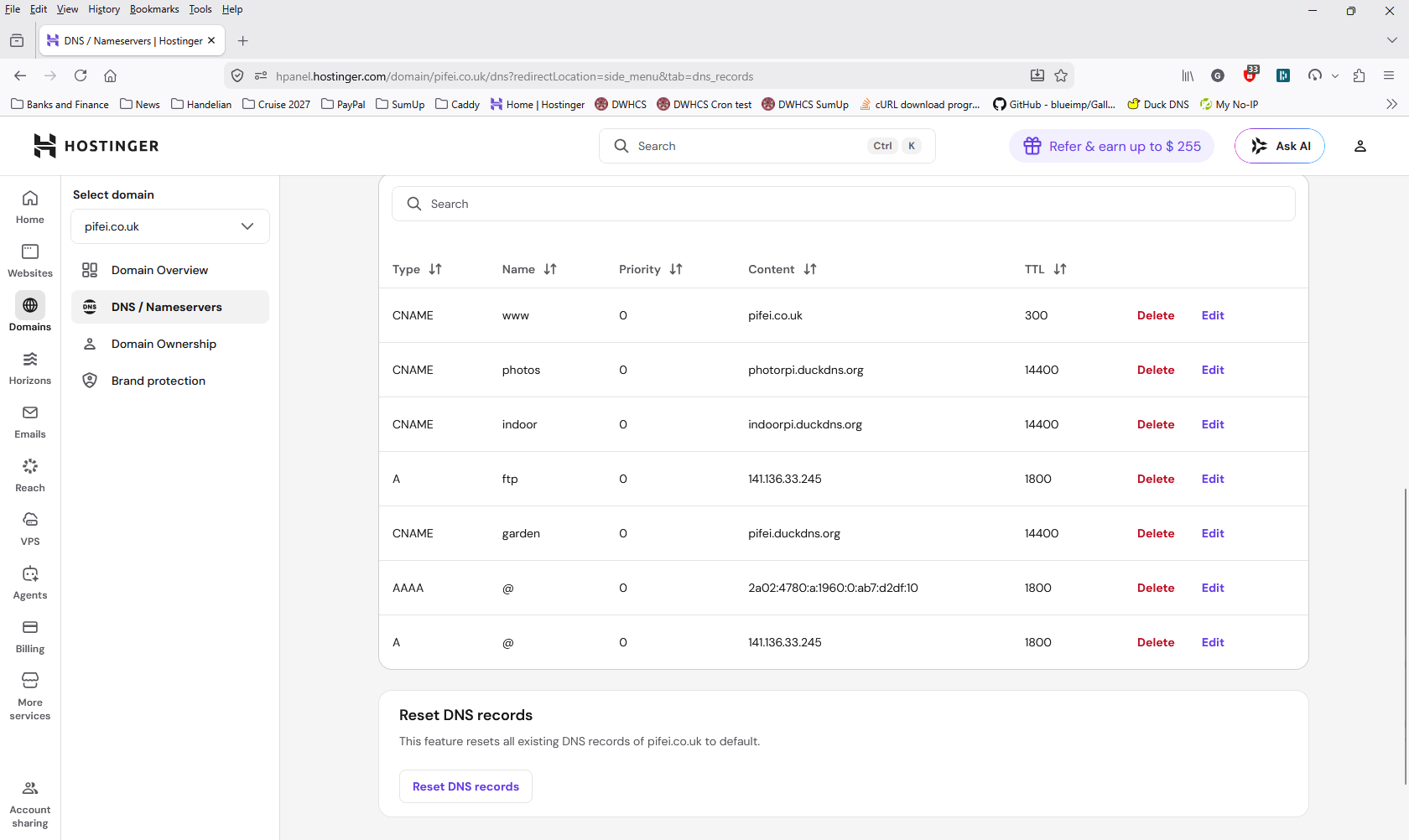
To get the other domain working, you will need to add a CNAME for indoor.pifei.co.uk to photorpi.duckdns.org. Or maybe a wildcard CNAME to pass all the hostnames to your duckdns address.

Once you have that in, what does curl -v https://indoor.pifei.co.uk show?

I would remove those :80 and :443 blocks from the Caddyfile for now, that is added complexity you don’t need. The :80 block is built in Caddy behaviour.

Thank you so much.

I have done what you said:


pi@pifei:/var $ curl -v https://indoor.pifei.co.uk

  • Host indoor.pifei.co.uk:443 was resolved.
  • IPv6: (none)
  • IPv4: 150.143.208.218
  • Trying 150.143.208.218:443…
  • ALPN: curl offers h2,http/1.1
  • TLSv1.3 (OUT), TLS handshake, Client hello (1):
  • CAfile: /etc/ssl/certs/ca-certificates.crt
  • CApath: /etc/ssl/certs
  • TLSv1.3 (IN), TLS handshake, Server hello (2):
  • TLSv1.2 (IN), TLS handshake, Certificate (11):
  • TLSv1.2 (OUT), TLS alert, unknown CA (560):
  • SSL certificate problem: unable to get local issuer certificate
  • closing connection #0
    curl: (60) SSL certificate problem: unable to get local issuer certificate
    More details here: curl - SSL CA Certificates

curl failed to verify the legitimacy of the server and therefore could not
establish a secure connection to it. To learn more about this situation and
how to fix it, please visit the webpage mentioned above.

What now?

So either caddy couldn’t generate a certificate, or your request was served by something else. Running gnutls-cli indoor.pifei.co.uk might tell you what certificate was served (from the package gnutls-bin).

Do you have any logs from caddy?

I tried your curl from here, but it times out connecting to that IP.

As I just added these subdomains, could it be that they haven’t propagated yet?

The IP resolved, so I don’t think it’s that - assuming the IP is correct. What do the logs and gnutls-cli say?

What about curl -v http://... (rather than https)?

Hamish

Thank you Hamish for all the effort you are putting into this!

I don’t seem to have a caddy log file and gnutls is not installed either.

If we concentrate on the photo pi first (ignore indoor pi and garden pi as they are both turned off for now)….

I have photorpi.duckdns.org (obviously on duckdns) and photos.pifei.co.uk (on Hostinger). photos.pifei.co.uk has a CNAME entry to photorpi.duckdns.org .

Maybe I have got this all wrong and the whole thing is going round in circles???

As you can see, I don’t have a clue of what I am doing!

Again, many thanks.

I think you can find the logs in the system journal: run journalctl -u caddy

I tried curl -v http://photorpi.duckdns.org and it timed out. Perhaps you have a firewall blocking it from here. That doesn’t seem to be the same problem that you are having from your testing.

I found the log (I think):

journalctl -xeu caddy.service
░░
░░ The job identifier is 9529.
Apr 08 16:19:13 pifei caddy[8082]: caddy.HomeDir=/var/lib/caddy
Apr 08 16:19:13 pifei caddy[8082]: caddy.AppDataDir=/var/lib/caddy/.local/share/caddy
Apr 08 16:19:13 pifei caddy[8082]: caddy.AppConfigDir=/var/lib/caddy/.config/caddy
Apr 08 16:19:13 pifei caddy[8082]: caddy.ConfigAutosavePath=/var/lib/caddy/.config/caddy/autosave.json
Apr 08 16:19:13 pifei caddy[8082]: caddy.Version=2.6.2
Apr 08 16:19:13 pifei caddy[8082]: runtime.GOOS=linux
Apr 08 16:19:13 pifei caddy[8082]: runtime.GOARCH=arm
Apr 08 16:19:13 pifei caddy[8082]: runtime.Compiler=gc
Apr 08 16:19:13 pifei caddy[8082]: runtime.NumCPU=1
Apr 08 16:19:13 pifei caddy[8082]: runtime.GOMAXPROCS=1
Apr 08 16:19:13 pifei caddy[8082]: runtime.Version=go1.24.2
Apr 08 16:19:13 pifei caddy[8082]: os.Getwd=/
Apr 08 16:19:13 pifei caddy[8082]: LANG=en_GB.UTF-8
Apr 08 16:19:13 pifei caddy[8082]: PATH=/usr/local/sbin:/usr/local/bin:/usr/sbin:/usr/bin
Apr 08 16:19:13 pifei caddy[8082]: NOTIFY_SOCKET=/run/systemd/notify
Apr 08 16:19:13 pifei caddy[8082]: USER=caddy
Apr 08 16:19:13 pifei caddy[8082]: LOGNAME=caddy
Apr 08 16:19:13 pifei caddy[8082]: HOME=/var/lib/caddy
Apr 08 16:19:13 pifei caddy[8082]: INVOCATION_ID=7557adaa4199465ab6d638645dcc3238
Apr 08 16:19:13 pifei caddy[8082]: JOURNAL_STREAM=9:70237
Apr 08 16:19:13 pifei caddy[8082]: SYSTEMD_EXEC_PID=8082
Apr 08 16:19:13 pifei caddy[8082]: {"level":"info","ts":1775661553.1691067,"msg":"using provided configuration","config_file":"/etc/caddy/Caddyfile","config_adapter":""}
Apr 08 16:19:13 pifei caddy[8082]: {"level":"warn","ts":1775661553.2150252,"msg":"Caddyfile input is not formatted; run the 'caddy fmt' command to fix inconsistencies","adapter":"caddyfile","file":"/etc/caddy/Caddyfile","line":26}
Apr 08 16:19:13 pifei caddy[8082]: {"level":"info","ts":1775661553.2523637,"logger":"admin","msg":"admin endpoint started","address":"localhost:2019","enforce_origin":false,"origins":["//localhost:2019","//[::1]:2019","//127.0.0.1:2019"]}
Apr 08 16:19:13 pifei caddy[8082]: {"level":"warn","ts":1775661553.2627935,"logger":"http","msg":"server is listening only on the HTTP port, so no automatic HTTPS will be applied to this server","server_name":"srv0","http_port":80}
Apr 08 16:19:13 pifei caddy[8082]: {"level":"info","ts":1775661553.2650623,"logger":"tls.cache.maintenance","msg":"started background certificate maintenance","cache":"0x2b592c0"}
Apr 08 16:19:13 pifei caddy[8082]: {"level":"info","ts":1775661553.2768204,"logger":"http.log","msg":"server running","name":"srv0","protocols":["h1","h2","h3"]}
Apr 08 16:19:13 pifei caddy[8082]: {"level":"info","ts":1775661553.2795103,"logger":"tls","msg":"cleaning storage unit","description":"FileStorage:/var/lib/caddy/.local/share/caddy"}
Apr 08 16:19:13 pifei caddy[8082]: {"level":"info","ts":1775661553.289797,"msg":"autosaved config (load with --resume flag)","file":"/var/lib/caddy/.config/caddy/autosave.json"}
Apr 08 16:19:13 pifei systemd[1]: Started caddy.service - Caddy.
░░ Subject: A start job for unit caddy.service has finished successfully
░░ Defined-By: systemd
░░ Support: https://www.debian.org/support
░░
░░ A start job for unit caddy.service has finished successfully.
░░
░░ The job identifier is 9529.
Apr 08 16:19:13 pifei caddy[8082]: {"level":"info","ts":1775661553.2966073,"msg":"serving initial configuration"}
Apr 08 16:19:13 pifei caddy[8082]: {"level":"info","ts":1775661553.4071648,"logger":"tls","msg":"finished cleaning storage units"}
lines 1569-1609/1609 (END)

I have also forwarded 192.168.1.110 (which is the master pi) on the router to ports 80 and 443.

What should the Caddyfile on the master pi have?

Any more ideas?

Thank you for your help, again.


This is superfluous as Caddy redirects automatically all HTTP traffic to HTTPS (unless auto_https global option is specified). Do not fall into the same mindset one applies when configuring Apache or nginx – Caddy is smarter. :slight_smile: Or, at least, the Caddyfile is.

Assuming 192.168.1.139 is where the photos app is listening on, and reachable from the RPi hosting Caddy,

photorpi.duckdns.org {
  reverse_proxy http://192.168.1.139:<port>
}

is enough. Not sure what you mean with the redir to some external domain, to be honest. If you want to issue certificates for both domains and have them reverse_proxy to 192.168.1.139, simply define both domains:

photorpi.duckdns.org photos.feichter.co.uk {
  reverse_proxy 192.168.1.139
}

Do the same here.

indoor.pifei.co.uk indoorpi.feichter.co.uk {
  reverse_proxy http://192.168.1.246:<port>
}

If any of those services listen on HTTPS, I recommend making them listen on HTTP only, otherwise you have to deal with TLS certificates inside your own network (or use tls_insecure_skip_verify, but I don’t recommend making a habit of using it).

Hi Alex

Thanks for your help, but still can’t make it work.

Here is my set up:

My route has only one port forwarding:

192.168.1.110 to 80
192.168.1.110 to 443

So, 192.168.1.110 is open on my router.

The Caddyfile on 192.168.1.110 is:

  GNU nano 8.4                                   /etc/caddy/Caddyfile
# The Caddyfile is an easy way to configure your Caddy web server.
#
# Unless the file starts with a global options block, the first
# uncommented line is always the address of your site.
#
# To use your own domain name (with automatic HTTPS), first make
# sure your domain's A/AAAA DNS records are properly pointed to
# this machine's public IP, then replace ":80" below with your
# domain name.

photorpi.duckdns.org {
        reverse_proxy http://192.168.1.139
}

# Refer to the Caddy docs for more information:
# https://caddyserver.com/docs/caddyfile


The Caddyfile on 192.168.1.139 is:

```
# The Caddyfile is an easy way to configure your Caddy web server.
#
# Unless the file starts with a global options block, the first
# uncommented line is always the address of your site.
#
# To use your own domain name (with automatic HTTPS), first make
# sure your domain's A/AAAA DNS records are properly pointed to
# this machine's public IP, then replace ":80" below with your
# domain name.

:80 {
        # Set this path to your site's directory.
        #root * /usr/share/caddy
        root * /var/www/html

        # Enable the static file server.
        file_server

        # Another common task is to set up a reverse proxy:
        # reverse_proxy localhost:8080

        # Or serve a PHP site through php-fpm:
        # php_fastcgi localhost:9000
}

# Refer to the Caddy docs for more information:
# https://caddyserver.com/docs/caddyfile

My Duckdns looks like this:

photorpi to my exterior ip address 150.143.208.218

Now…

The only reply I get in the browser is from 192.168.1.139 on http (not on https):

Hello world from photopi on 192.168.1.139 

All other request to 192.168.1.110, http://photorpi.duckdns.org/, or anything else fail.

Where you say

Where do I find or set the port number? I have no idea on where or how to do that.

So sorry about all these newbie problems!!!

Any help is really appreciated and I just have not been able to find a tutorial that matches what I want to achieve.

curl -v http://photorpi.duckdns.org now completes for me with a response from caddy. https too - “Hello world”. It’s a completely different IP than before though. Are you making progress?

The https://indoor.pifei.co.uk site now returns a page from Hostinger though.

Sorry guys will reply later tonight. Going to collect my wife from hospital!

Based on the diagram posted prior only MasterPi needs to run a Caddy, and on the router port 80 and 443 to MasterPi must be forwarded/shared. MasterPi’s Caddy will then reverse proxy to PhotoPi, GardenPi and IndoorPi. This proxying does not need further firewall/router configuration since it’s all in the same local network as MasterPi. That’s what reverse proxying is: You connect to MasterPi, and MasterPi will further connect itself to the upstream addresses you specify – outsiders don’t need to know where Caddy reverse-proxies their requests. Or how.

A complete Caddyfile running on MasterPi would look like this for you:

photorpi.duckdns.org photos.feichter.co.uk {
  reverse_proxy http://192.168.1.139:<port>
}

indoor.pifei.co.uk indoorpi.feichter.co.uk {
  reverse_proxy http://192.168.1.246:<port>
}

garden.pifei.co.uk gardenpi.feichter.co.uk {
  reverse_proxy http://192.168.1.xxx:<port>
}

In this Caddyfile, fill in the local IP address of GardenPi in the reverse_proxy directive there. Then fill in the ports of the services running on photorpi, indoorpi and gardenpi in their respective reverse_proxy directives.

Thank you Alex! I am STARTING to understand…

For now, let’s forget about photopi and indoorpi, as I am having trouble getting them running…

So, let’s stick with gardenpi.

This is what I now have in the caddyfile on the master:

garden.pifei.co.uk gardenpi.feichter.co.uk {
        reverse_proxy http://192.168.1.235
        root * /var/www/html

        # Enable the static file server.
        file_server
}

As you can see, I have added a root and file_server which should display ‘Hello world from the GardenPi’ on successful connection.

gardenpi.feichter.co.uk is the domain registered with hostinger which takes me to the main garden site, but has nothing to do with the raspberry pi.

garden.pifei.co.uk does nothing.

I had apache2 installed on the gardenpi, which I have uninstalled with ‘sudo apt-get purge apache2’, just in case that would cause a problem.

In your comment above you have ‘port’ after the internal ip address. Where would I find that and why?

P.S.: the ip address for the gardenpi ends in 235. I have also registered ‘gardenrpi.duckdns.org’ in case that’s needed.

So sorry for being so thick!

Again, many thanks!!

It won’t because everything is reverse-proxied to http://192.168.1.235, and on that address, since you used http:// without a port, something must answer on the standard HTTP port 80 on that GardenPi, so if you want it answering with Hello world from the GardenPi, reinstall Apache and configure it to serve an index.html with that line.

But you don’t put a GardenPi up to host a simple file, right? Whatever you want it to host (= whatever you want to reach when browsing to gardenpi.feichter.co.uk), start that software up and point Caddy to its port. That’s what those :<port> parts in the reverse_proxy address are for.

If you specify which software you’re hosting on GardenPi and would like to reach, we can consult its documentation additonally to help you get it up and running, but I don’t know how off-topic that would be in Caddy support forums. :slight_smile: We’ll cross that bridge when we get there :smiley:

Thank you Alex!

This is getting weirder by the minute…

So, I have started from scratch. Wiped the photopi (on 192.168.1.139) and pifei (on 192.168.1.110).

photopi is running on a raspberry pi zero 2 w.

pifei is running on a raspberry pi 1 model B plus.

Both have only caddy installed with no modifications to the Caddyfile.

I followed the instructions on cuddy:

sudo apt install -y debian-keyring debian-archive-keyring apt-transport-https curl
curl -1sLf 'https://dl.cloudsmith.io/public/caddy/stable/gpg.key' | sudo gpg --dearmor -o /usr/share/keyrings/caddy-stable-archive-keyring.gpg
curl -1sLf 'https://dl.cloudsmith.io/public/caddy/stable/debian.deb.txt' | sudo tee /etc/apt/sources.list.d/caddy-stable.list
sudo chmod o+r /usr/share/keyrings/caddy-stable-archive-keyring.gpg
sudo chmod o+r /etc/apt/sources.list.d/caddy-stable.list
sudo apt update
sudo apt install caddy

The Caddyfile is the same for both installations (as it comes from the install).

# The Caddyfile is an easy way to configure your Caddy web server.
#
# Unless the file starts with a global options block, the first
# uncommented line is always the address of your site.
#
# To use your own domain name (with automatic HTTPS), first make
# sure your domain's A/AAAA DNS records are properly pointed to
# this machine's public IP, then replace ":80" below with your
# domain name.

:80 {
        # Set this path to your site's directory.
        root * /usr/share/caddy

        # Enable the static file server.
        file_server

        # Another common task is to set up a reverse proxy:
        # reverse_proxy localhost:8080

        # Or serve a PHP site through php-fpm:
        # php_fastcgi localhost:9000
}

# Refer to the Caddy docs for more information:
# https://caddyserver.com/docs/caddyfile

There is no port forwarding in my router.

NOW…

If I type http://192.168.1.139 into my browser, I get the ‘Caddy works!’ slanted page!

However, if I type http://192.168.1.110 into my browser, I get ‘Looks like there’s a problem with this site Firefox can’t connect to the server’ at 192.168.1.110’.

So, on 192.168.1.110 I have typed ‘systemctl status caddy.service’ which returned:

× caddy.service - Caddy
     Loaded: loaded (/usr/lib/systemd/system/caddy.service; enabled; preset: enabled)
     Active: failed (Result: signal) since Sat 2026-04-11 11:04:44 BST; 15min ago
 Invocation: e97d922b59584c7683fe96ea5678994d
       Docs: https://caddyserver.com/docs/
    Process: 1113 ExecStart=/usr/bin/caddy run --environ --config /etc/caddy/Caddyfile (code=killed, signal=ILL)
   Main PID: 1113 (code=killed, signal=ILL)
        CPU: 254ms

Apr 11 11:04:44 pifei systemd[1]: Starting caddy.service - Caddy...
Apr 11 11:04:44 pifei systemd[1]: caddy.service: Main process exited, code=killed, status=4/ILL
Apr 11 11:04:44 pifei systemd[1]: caddy.service: Failed with result 'signal'.
Apr 11 11:04:44 pifei systemd[1]: Failed to start caddy.service - Caddy.

I then typed ‘journalctl -xeu caddy.service ‘ and that gives me:

Apr 11 11:02:38 pifei systemd[1]: Failed to start caddy.service - Caddy.
░░ Subject: A start job for unit caddy.service has failed
░░ Defined-By: systemd
░░ Support: https://www.debian.org/support
░░
░░ A start job for unit caddy.service has finished with a failure.
░░
░░ The job identifier is 1064 and the job result is failed.
Apr 11 11:04:44 pifei systemd[1]: Starting caddy.service - Caddy...
░░ Subject: A start job for unit caddy.service has begun execution
░░ Defined-By: systemd
░░ Support: https://www.debian.org/support
░░
░░ A start job for unit caddy.service has begun execution.
░░
░░ The job identifier is 1172.
Apr 11 11:04:44 pifei systemd[1]: caddy.service: Main process exited, code=killed, status=4/ILL
░░ Subject: Unit process exited
░░ Defined-By: systemd
░░ Support: https://www.debian.org/support
░░
░░ An ExecStart= process belonging to unit caddy.service has exited.
░░
░░ The process' exit code is 'killed' and its exit status is 4.
Apr 11 11:04:44 pifei systemd[1]: caddy.service: Failed with result 'signal'.
░░ Subject: Unit failed
░░ Defined-By: systemd
░░ Support: https://www.debian.org/support
░░
░░ The unit caddy.service has entered the 'failed' state with result 'signal'.
Apr 11 11:04:44 pifei systemd[1]: Failed to start caddy.service - Caddy.
░░ Subject: A start job for unit caddy.service has failed
░░ Defined-By: systemd
░░ Support: https://www.debian.org/support
░░
░░ A start job for unit caddy.service has finished with a failure.
░░
░░ The job identifier is 1172 and the job result is failed.

So, it looks like caddy is not properly installed on 192.168.1.110.

Could it be, because this is a first generation raspberry pi (i.e. very old)? However, the raspian trixie seems to work?

Until, I sort this out, there is no point in me going further. I may have to ditch this very old pi and replace it with a newer one.

Any advice gratefully received!

UPDATE:

Well, I started again from scratch. Used raspberry pi imager to burn trixie to the sd card. Then installed caddy.

However, I noticed during the installation of caddy this error:

pi@pifei:~ $ sudo apt install caddy
The following package was automatically installed and is no longer required:
  retry
Use 'sudo apt autoremove' to remove it.

Installing:
  caddy

Summary:
  Upgrading: 0, Installing: 1, Removing: 0, Not Upgrading: 4
  Download size: 16.2 MB
  Space needed: 44.8 MB / 27.1 GB available

Get:1 https://dl.cloudsmith.io/public/caddy/stable/deb/debian any-version/main armhf caddy armhf 2.11.2 [16.2 MB]
Fetched 16.2 MB in 12s (1,398 kB/s)
Selecting previously unselected package caddy.
(Reading database ... 86351 files and directories currently installed.)
Preparing to unpack .../caddy_2.11.2_armhf.deb ...
Unpacking caddy (2.11.2) ...
Setting up caddy (2.11.2) ...
Created symlink '/etc/systemd/system/multi-user.target.wants/caddy.service' → '/usr/lib/systemd/system/caddy.service'.
Could not execute systemctl:  at /usr/bin/deb-systemd-invoke line 148.
Processing triggers for man-db (2.13.1-1) ...

(The error on line 148!)

Is this the problem??