Sorry, a little more help is needed….
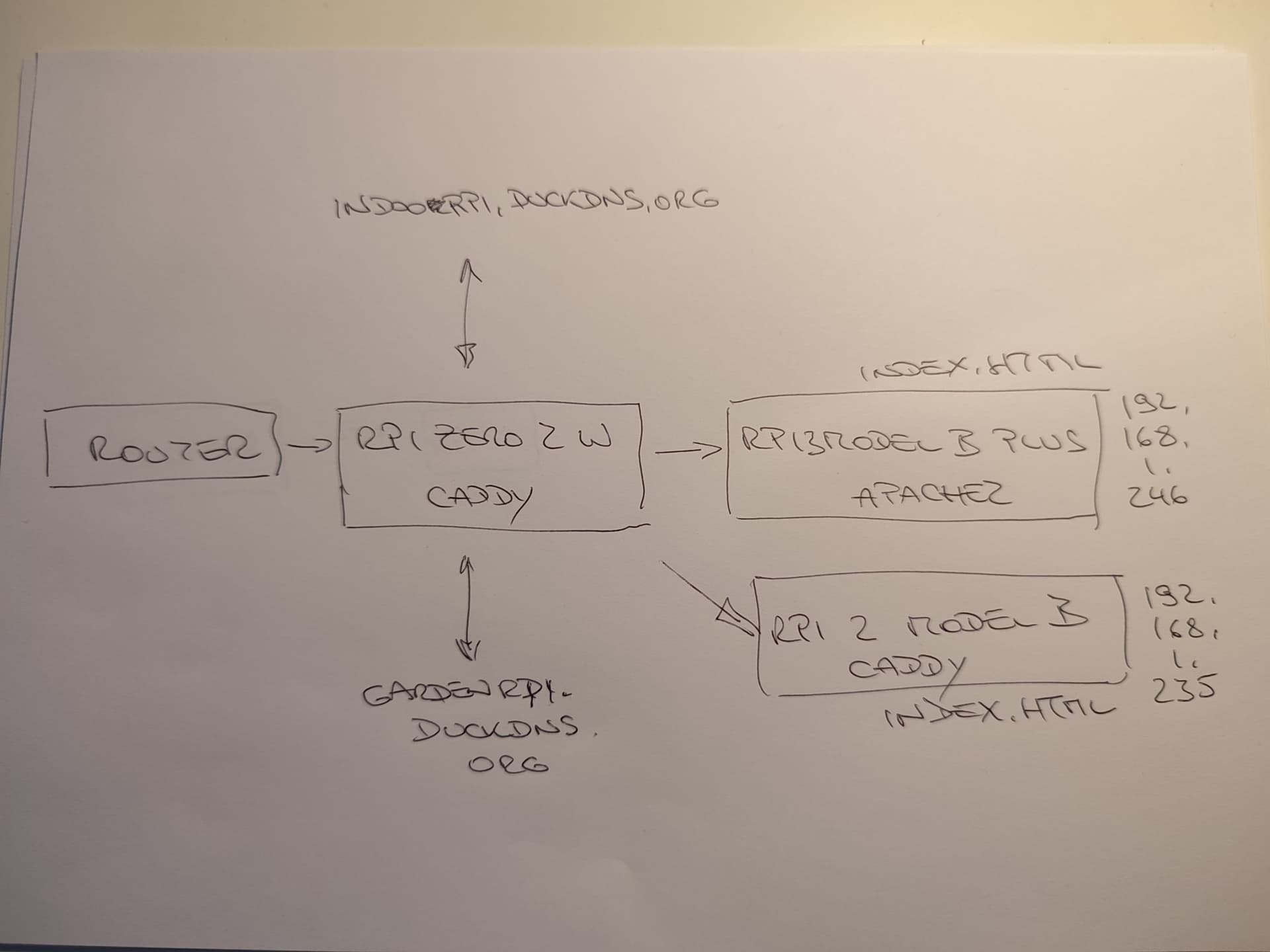
Attached a diagram of my set up.
Caddy works! This is the gardenrpi.duckdns.org which calls the index.html page and works (as you can see).
However…
https://indoorpi.duckdns.org/index.html , which is running apache2 and also calls an index.html page. Doesn’t work. Why
The Caddyfile on the RPI Zero 2 W (master) is:
gardenrpi.duckdns.org {
reverse_proxy http://192.168.1.235
root * /var/www/html
# Enable the static file server.
file_server
}
indoorpi.duckdns.org {
reverse_proxy http://192.168.1.246
root * /var/www/html
# Enable the static file server.
file_server
}
So, the only difference between indoor and garden is that one is running apache2 and the other is running caddy.
Any help, as always, greatly appreciated!
UPDATE:
So on 192.168.1.235 (GardenPi running caddy), I have now installed php-fpm (sudo apt-get install php-fpm).
I executed ‘grep -r “listen =” /etc/php/*/fpm/pool.d/’ to find that fpm is listening to 127.0.0.1:9001.
So, I edited the Caddyfile with this:
:80 {
# Set this path to your site's directory.
        root * /usr/share/caddy

        # Enable the static file server.
        file_server
# Another common task is to set up a reverse proxy:
# reverse_proxy localhost:8080
# Or serve a PHP site through php-fpm:
#php_fastcgi 127.0.0.1:9001
@phpFiles path *.php
reverse_proxy @phpFiles 127.0.0.1:9001 {
transport fastcgi {
split .php
}
}
}
I tried both fastcgi and @phpFilesphpFiles but both still fail.
The file I am trying to access is https://gardenrpi.duckdns.org/php-info.php –> doesn’t work
However, Caddy works! –> works!!
Surely, it can’t be that hard to serve a php file???