I setup the TOTP authenticator (KeePassXC) as usual and all seemed, as usual, fine.
However it’s failing 100% of the time since, when I try to login in the normal way – user + pw + totp code
The only thing I can see is the normal login approach, the discourse automatically add an and initiates the login process without me needing to click blue [log in] button.
If however I restart the process from the beginning, and use the ‘skip password and get an e-mail’ option, the link provided which then asks for the TOTP code accepts the code and -waits- for me to click [ Log in ] … and works as expected.
You know, I had an issue like this on other sites once, like multiple sites including my credit card/bank, and some other major accounts. I thought my password manager 1Password was trippin’. But it turns out my PC clock was wrong.
My clock is in sync using 3 nist pools and ticks in ~perfect sync with time.gov
I’ve no trouble with 2FA login to the discourse used at https://discuss.linuxcontainers.org/ ..I think that’s the only other discourse login I have to compare with.
I will enable it again here and see how it goes. It’s odd that the OTP worked fine by the email link both times, and 0/2 on the normal OTP login.
I setup the TOTP 2FA (fwiw: manual code reveal to seed the authenticator), generated the backup codes and logged out.
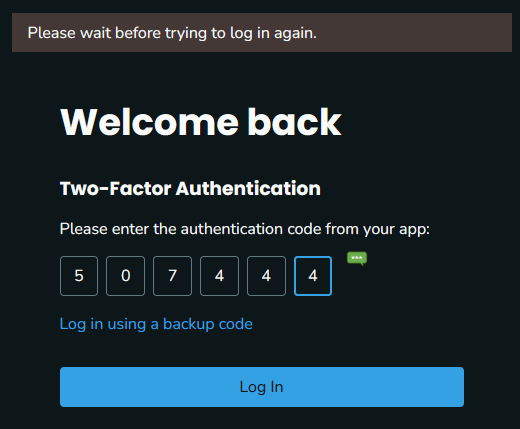
I manually input the auth code (vs KeePassXC browser plug-in filling) and ‘please wait before trying to log in again’ – fyi, same outcome using the browser plug-in to provide the code or manually input.
This time I just used one of the backup codes to login.
The only other thing I can think of is that the failure is instant. I see no login spinner on the [ Log In ] button as I see when login to the other discourse I use.
..on the secret key input (setting up the TOTP) I’m going with the default (RFC 6238) settings which seem to be always correct for the multitude of sites I use 2FA.
Unless it’s considering the time I presented the name + pw creds it’s rate limiting against what?
..the 1st code entry prompt I see is failing. I tried it several times after discovering the failure, of no specific cadence, but I did attempt to account for some rate limiting by waiting.. I don’t recall the max I waited before trying again, but I probably waited ~minute, maybe longer.
I’ll give it a try again and see how it deals with an ample amount of time delay after the initial instant failure.
It’s exactly that. After you’ve entered your name/password, you can’t submit to the same endpoint (which is where the TOTP goes too) for a minute. So just wait at least a minute, make sure you submit an updated TOTP code though.
Sorry about the aggressive rate limiting. We had a bad case of scammers/spammers hitting the forum, and the rate limiting helped slow it down to manageable volume.
I did read about the spam invasion while browsing through the topics. Good riddance and worth the pause to before 2FA if it’s helped keep the varmints out.
I guess a majority of visitors use alternate logins like google, etc or no 2FA.. or I missed the PSA Got one now!
 Got one now!