If you go to https://dcsmovies.com it shows cloudflare error 525 SSL handshake failed. Cloudflare is unable to establish an SSL connection to the origin server.
2. Error messages and/or full log output:
no
PASTE OVER THIS, BETWEEN THE ``` LINES.
Please use the preview pane to ensure it looks nice.
3. Caddy version:
v2.10.2
4. How I installed and ran Caddy:
i clicked download on the website
a. System environment:
windows. i have a docker on there but caddy isnt on the docker at all.
b. Command:
caddy run
PASTE OVER THIS, BETWEEN THE ``` LINES.
Please use the preview pane to ensure it looks nice.
c. Service/unit/compose file:
no
PASTE OVER THIS, BETWEEN THE ``` LINES.
Please use the preview pane to ensure it looks nice.
Not enough information to troubleshoot. The issue could be anywhere:
a misconfiguration in your Cloudflare setup
a firewall on your server or router that’s blocking access from Cloudflare to Caddy
a misconfigured Cloudflare tls setting in your Caddy config
Make sure Cloudflare can actually reach your Caddy server. Share your Caddy logs, and consider posting a screenshot of your Cloudflare settings for this setup.
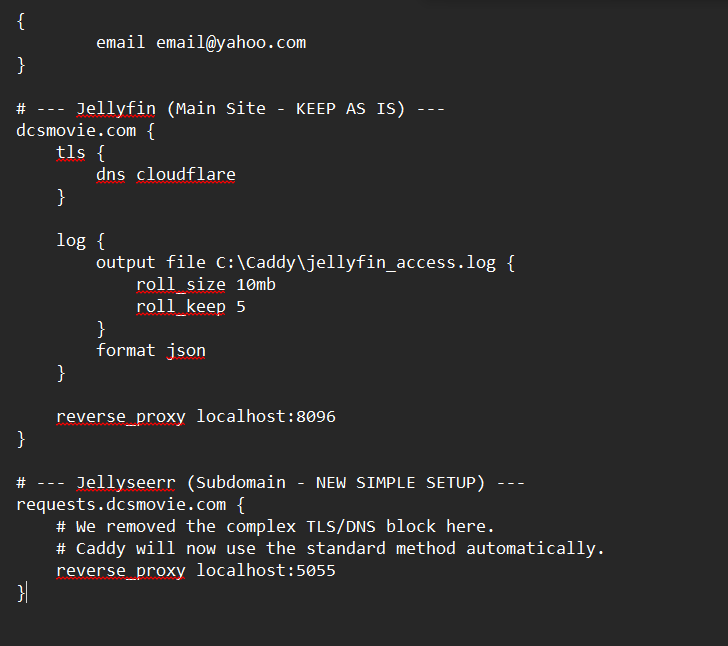
And most importantly, please post your Caddyfile in a code block. The form template tells you exactly how to do it:
PASTE OVER THIS, BETWEEN THE ``` LINES.
Please use the preview pane to make sure it looks nice.
Sorry i didnt really understand that template thing. very confusing. i didnt see ‘ ‘ ‘ anywhere to paste between the lines. Then the first question didnt require that. Sorry just was confused on all the wording everywhere.
Do I need to post the stuff in the reply or make a new post?
Sidenote the website crashes using brave browser. Every time i try to submit a post.
Just in Case im supposed to post here, here are screenshots
Caddy