Reverse proxy logs don't have time stamp like caddy log

1. The problem I’m having:

My caddy file has logging for caddy and for my reverse proxy blocks, but only the caddy file shows time stamps. Why would this be? How can I add time stamps to the RP logs?

My caddy file has logging for caddy and for my reverse proxy blocks, but only the caddy file shows time stamps. Why would this be? How can I add time stamps to the RP logs?

2. Error messages and/or full log output:

RP log:
{"level":"error","ts":1788184850.169316,"logger":"http.log.access.log0","msg":"handled request" ...

caddy log:
2026/09/01 17:35:14	e[34mINFOe[0m	http.auto_https	enabling automatic HTTP->HTTPS redirects

3. Caddy version:

v2.11.4

4. How I installed and ran Caddy:

caddy run

a. System environment:

Windows

b. Command:


c. Service/unit/compose file:


d. My complete Caddy config:

{
	#log stdout
	log caddy-log {
		output file caddy.log {
			roll_local_time
		}
		format console {
			time_format wall
			time_local
		}
	}
	email blah@blah.net
	default_sni someplace.com
	servers :8443 {
		protocols h2 h1
	}
}
(logging) {
	log {
		output file "caddyLog-{args[0]}.log" {
			roll_local_time
		}
		format console {
			time_format wall
			time_local
		}
		format filter {
			fields {
				request>headers>Authorization delete
			}
		}
	}
}
#file server
web.someplace.com:8443 {
	import logging web
	reverse_proxy :8080
	encode zstd gzip
	header Strict-Transport-Security "max-age=31536000"
}

5. Links to relevant resources:

Type here
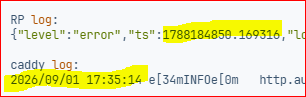
Doh. The RP log is structured and has an Epoch time stamp.

So maybe I should be asking how to get a simpler, output that includes a time stamp?

Why is the caddy log not structured?

Help? Any suggestions about the second post?

You configured the format as console. It structures the data, but the message remains text.

In console format, the timestamp is at the beginning of the line, like this:

2026/10/03 00:30:09	INFO	http.log.access.log0	handled request	{"request": {"remote_ip": "127.0.0.1", "remote_port": "54705", "client_ip": "127.0.0.1", "proto": "HTTP/2.0", "method": "GET", "host": "localhost", "uri": "/favicon.ico", "headers": {"Priority": ["u=6"], "Te": ["trailers"], "Accept": ["image/avif,image/webp,image/png,image/svg+xml,image/*;q=0.8,*/*;q=0.5"], "Accept-Language": ["en-US,en;q=0.9"], "Sec-Fetch-Site": ["same-origin"], "User-Agent": ["Mozilla/5.0 (Macintosh; Intel Mac OS X 10.15; rv:157.0) Gecko/20100101 Firefox/157.0"], "Referer": ["https://localhost/"], "Sec-Fetch-Mode": ["no-cors"], "Dnt": ["1"], "Accept-Encoding": ["gzip, deflate, br, zstd"], "Sec-Fetch-Dest": ["image"]}, "tls": {"resumed": false, "version": 772, "cipher_suite": 4865, "proto": "h2", "server_name": "localhost", "ech": false}}, "bytes_read": 0, "user_id": "", "duration": 0.000624236, "size": 13, "status": 200, "resp_headers": {"Date": ["Fri, 02 Oct 2026 21:30:09 GMT"], "Content-Length": ["13"], "Via": ["1.1 Caddy"], "Alt-Svc": ["h3=\":443\"; ma=2592000"], "Content-Type": ["text/plain; charset=utf-8"], "Server": ["Caddy"]}}

You can see the time is wall format. If you want fully structured log lines, change the format to json which will include the timestamp within the log structure..

I didn’t say I wanted structured logs.

The formatting for the Caddy log and RP log is the same, but the output is different. Why doesn’t the RP log honor the formatting instructions?

It did. What’s the format you’re expecting?

These don’t look the same to me:

image