I have been running the Unifi Network Application using the LinuxServer.io Docker images. I also use Caddy for SSL reverse proxy. Today I discovered that Caddy 2.11 broke my configuration; the root cause was the change in behavior to header_up Host.
Here is my updated Caddyfile that fixes this issue in Caddy 2.11:
Could you please clarify the working reverse proxy configuration or post a diff? Is the only change the addition of header_up Host {host} ? Can you also clarify what the broken behaviour was? Was it a blank/empty response but with HTTP 200 OK status code?
We’ve just upgraded our core ingress router to caddy 2.11 and to roll back to 2.10 as each of our reverse proxies to HTTPS backend using the tls_insecure_skip_verify config were broken; and annoyingly the result was an empty body with HTTP 200 OK, meaning our external and internal monitors relaying on status code response did not pick up the error.
But yes, in 2.11 we made this change because the previous default, although consistent with that of HTTP upstreams (which I much enjoyed), made it easy to have misconfigurations in some common cases that could lead to security vulnerabilities (though it was not a security bug in and of itself).
I’m not sure about the OP, but we use this internally in the following configuration:
Client app stack(s) in docker → Caddy (caddy-docker-proxy) as the ‘ingress router’ for the docker host→ Caddy (standard caddy) as the ‘global router’ at our network edge (this instance routes requests to many different customer environments) → Cloudflare
In this configuration, we use tls_insecure_skip_verify for connections from our ‘global router’ reverse proxy to the caddy ‘ingress router’ for the client’s environment. As this connection is all within our internal environment (internal on-prem network), we’ve currently opted to skip verify. Long term the plan is broader trusted PKI, but we have not implemented this.
For some of the domains we are proxying we can utilise HTTP or DNS challenges effectively, and have to rely on tls internal , as the domain is external to us (customer owned), and the “public facing” TLS is manged by Cloudflare.
Can you also clarify what the broken behaviour was? Was it a blank/empty response but with HTTP 200 OK status code?
The homepage would load, but when you tried to login, you get a password error. I used developer tools in the web browser to debug the issue, and I saw the web service that processes logins was failing. I resolved the issue when I reverted to Caddy 2.10, so I read the release notes and figured this was an issue with reverse proxying. I changed header_up in my Caddyfile, upgraded back to Caddy 2.11, and the issue was resolved.
Ha! Because the UniFi Network Application (the upstream server) creates its own self-signed SSL certificate. That runs in its own Docker container on the same Docker server and Docker network as Caddy. And if the UniFi Network Application is compromised, SSL is the least of my worries…
(There exists a way to replace that self-signed certificate, but it’s extremely tedious and not something that could be easily automated. And I suspect it would break other critical functions for that server.).
@gglockner, thank you for posting this. I was having an issue with my DMSE where it would let me log in but then was stuck loading the dashboard (or any other part of the interface for that matter). That one little line fixed it right up.
the header_up Host {host} workaround does restore the general UniFi page loading behavior with Caddy 2.11, but it does not fully solve the regression.
In my case, the UniFi interface becomes reachable again, but live camera feeds in Protect no longer work afterwards. The result is that the main UI loads, but camera live views are broken, which makes this workaround insufficient in practice.
Because of that, I would strongly suggest reconsidering or reverting this change. While the intention was understandable - making common HTTPS upstream setups less prone to subtle misconfiguration and possible security issues - this behavior change appears to introduce a serious breaking change for existing real-world reverse proxy setups such as UniFi.
From my perspective, the practical impact is worse than the problem it tries to prevent:
before: existing UniFi reverse proxy setups worked
after 2.11: UniFi may fail to load at all unless header_up Host {host} is added
with the workaround: the page loads again, but Protect live camera feeds are still broken
So even the recommended workaround only partially restores functionality.
Please consider reverting this change, or at least providing a compatibility option that restores the pre-2.11 behavior for HTTPS upstreams.
I also came across the note about using hostport instead of only host. After changing the config accordingly, live views are now working for me again as well.
So for anyone else affected, this seems to be the more reliable workaround:
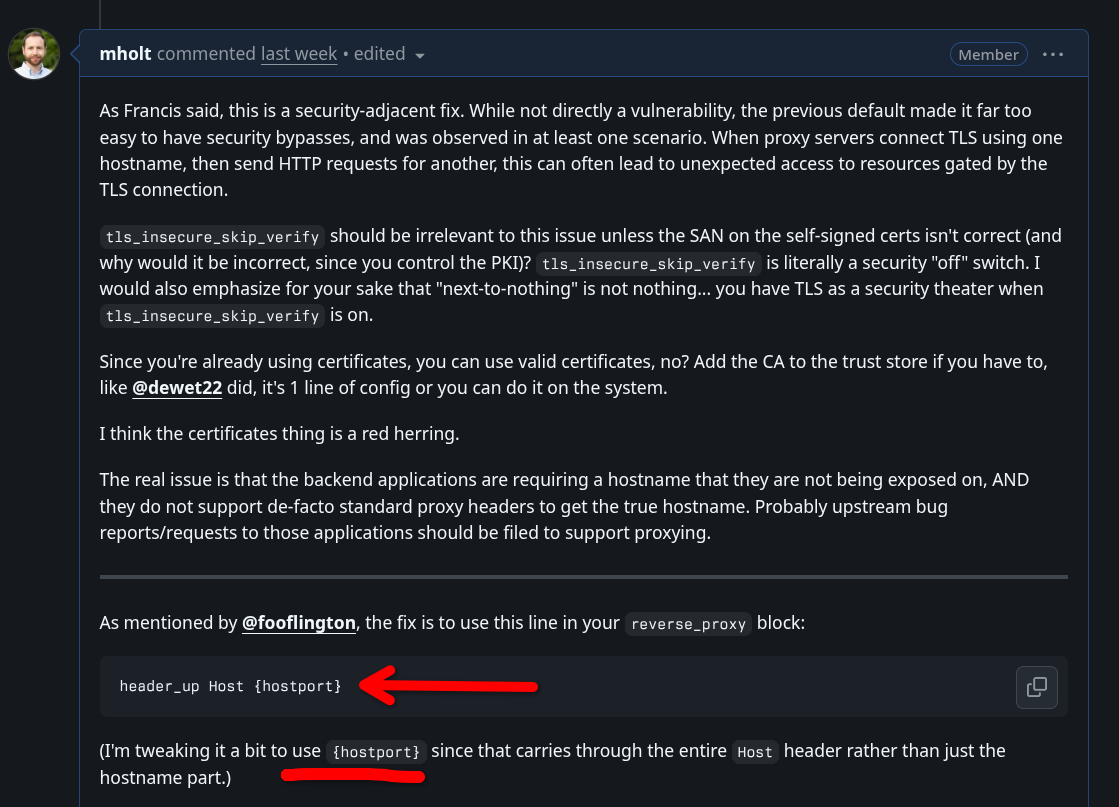
header_up Host {hostport}
instead of only:
header_up Host {host}
I wanted to share that in case it helps others who run into the same issue.
That said, I do think this situation highlights a broader concern around release expectations. From a user perspective, this was a breaking behavioral change in a stable release, and it resulted in a fairly time-consuming troubleshooting process for setups that had previously been working without issue.
I also do not find the argument about plugins particularly persuasive as a reason to move away from semantic versioning expectations. In many ecosystems, plugin compatibility is handled with defined minimum and maximum supported versions, so semver-compatible dependency ranges are entirely possible in principle.
My concern is less about the specific technical change itself and more about how disruptive changes like this are introduced. When a change can break established reverse proxy setups in non-obvious ways, it would be much easier on users if that were either reserved for a major version, made opt-in, or communicated much more prominently as a breaking change.
Now that I understand the reason for the change and have a working workaround, I appreciate the intent behind it. But the path to getting there was much more difficult than it should have been, and I think that is worth reflecting on.
The breakage is actually obvious which was part of the point. Clarifying the factors we considered for this:
Alternative (previous behavior) is non-obvious insecurity. Application functions but has security vulnerabilities in some cases.
This behavior breaks in an obvious way, and has an easy fix: header_up Host {hostport}
Practically, this change mostly only affects those connections where tls_insecure_skip_verify is used, and these are not really officially considered legitimate production use cases. Disabling security is just not a great solution in any case. Caddy can fully automate internal PKI and apps or Caddy, one way or another, can be configured to properly trust the certs. (And I am not sure I have seen a complaint where this option was not used.)
So, I think in the grand scheme of things, breakage was actually very minimal, obvious, and seems to be limited to controversial configs anyway…
Sorry the release notes were not more clear. We did highlight this change, but maybe it needed a or something?
Matt elaborated on the reasoning and need for the change, but I want to address another point. This
doesn’t work in the Go ecosystem. There’s no such thing as “minimum and maximum supported versions”. Therefore the statement that it’s “entirely possible in principle” isn’t applicable in the Go ecosystem.
If you’re interested in learning more about this, I encourage you to read Russ Cox thesis on the subject:
I’m actually wondering why the logs would say unnecessary header here?
I also had to implement this fix with the UISP application. I’m self hosting it, and when visiting it through caddy, it took me to the IP of the VM. With the fix it works with just the domain.
I just want to add that this solved an issue i encountered with a netbox lxc container behind caddy. I would get “Forbidden (403) CSRF verification failed. Request aborted“ when trying to login. Landing page worked but after trying to login, i would get the above mentioned error. Adding the headers solved the issue.
I can confirm this workaround fixed Unifi OS, which is using Web Socket to wrap some of the UI elements. It was loading a header line on the page, but no other content, and I could see connection errors in the browser debug console.
Simply adding header_up Host {hostport} to the Caddy config made all of these errors go away and it loads properly now.
@gglockner - Would you mind helping me understand if your suggested block of code is a simple copy paste, which I don’t believe it is, or if what is shown as $DOMAIN is to be replaced with something. I’m new to caddy and have already struggled enough with the unifi controller that I don’t know what I am doing wrong. Perhaps you could paste your working block and simply change any unique items to your config (URLs) so that we can easily identify what needs to be changed. I thank you in advance for your understanding and help.
I managed to finally hack my way to a working version. For those who came here looking for a simple copy/paste, this block worked for me. Simply change any reference to “unifi” with your expected sub domain, along with the obvious reference to “mydomain.com” and the IP address of where your unifi controller is being hosted.
Remember to preserve formatting when pasting, ie: all them spaces.
small thing I’d watch with unifi/caddy 2.11: a simple “is it 200?” check can lie to you here.
the first html page can load fine while websocket or api calls fail in the browser. I’d check devtools → network/console and also the unifi logs for rejected host/origin stuff.
for header_up Host, {host}, {hostport}, and {upstream_hostport} are not interchangeable. the right one is basically “whatever unifi expects to see”. one quick test is curling the upstream directly with the same Host header caddy will send, then checking whether the websocket/api requests work too, not just the initial page.
 or something?