Redirect subdomains to other public servers with caddy

1. The problem I’m having:

we have many subdomains and want to use a central Caddy server to redirect all requests to the subdomains to other caddy public servers. We are doing this in order to avoid creating thousands of DNS entries for each subdomain, instead we use a dns * wildcard that points to the main Caddy server

2. Error messages and/or full log output:

a.test.com {reverse_proxy https://12.123.12.244}
b.test.com {reverse_proxy https://12.123.12.244}
c.test.com {reverse_proxy https://12.123.12.244}

3. Caddy version:

v2.11.2

4. How I installed and ran Caddy:

installed on a Debian server

a. System environment:

Debian server

b. Command:

we have the main Caddy server that reverse_proxy to other Caddy servers with the same subdomains but configured as serving files with

a.test.com {
  root * /var/www/a.test.com
  file_server
}

c. Service/unit/compose file:


d. My complete Caddy config:

we have the main server with the following configuration

a.test.com {
	reverse_proxy https://12.123.12.244
}

and the receiving Caddy server at IP 12.123.12.244 configured like this:

a.test.com {
	root * /var/www/a.test.com
	file_server
}

another test

we tried to use the following on the main server:


a.test.com {
reverse_proxy 12.123.12.244:443
}


and we get the following error in the browser:

Client sent an HTTP request to an HTTPS server.
```

Please share the error log from the central Caddy server and the curl command tests you ran against it.

curl -v https://test.com

* Host test.com:443 was resolved.
* IPv6: (none)
* IPv4: 4.121.23.98
*   Trying 4.121.23.98:443...
* Connected to test.com (4.121.23.98) port 443
* ALPN: curl offers h2,http/1.1
* (304) (OUT), TLS handshake, Client hello (1):
*  CAfile: /etc/ssl/cert.pem
*  CApath: none
* (304) (IN), TLS handshake, Server hello (2):
* (304) (IN), TLS handshake, Unknown (8):
* (304) (IN), TLS handshake, Certificate (11):
* (304) (IN), TLS handshake, CERT verify (15):
* (304) (IN), TLS handshake, Finished (20):
* (304) (OUT), TLS handshake, Finished (20):
* SSL connection using TLSv1.3 / AEAD-CHACHA20-POLY1305-SHA256 / [blank] / UNDEF
* ALPN: server accepted h2
* Server certificate:
*  subject: CN=test.com
*  start date: Apr 19 17:41:40 2026 GMT
*  expire date: Jul 18 17:41:39 2026 GMT
*  subjectAltName: host "test.com" matched cert's "test.com"
*  issuer: C=US; O=Let's Encrypt; CN=E8
*  SSL certificate verify ok.
* using HTTP/2
* [HTTP/2] [1] OPENED stream for https://test.com/
* [HTTP/2] [1] [:method: GET]
* [HTTP/2] [1] [:scheme: https]
* [HTTP/2] [1] [:authority: test.com]
* [HTTP/2] [1] [:path: /]
* [HTTP/2] [1] [user-agent: curl/8.7.1]
* [HTTP/2] [1] [accept: */*]
> GET / HTTP/2
> Host: test.com
> User-Agent: curl/8.7.1
> Accept: */*
> 
* Request completely sent off
< HTTP/2 400 
< alt-svc: h3=":443"; ma=2592000
< via: 1.0 Caddy
< content-type: text/plain; charset=utf-8
< date: Mon, 20 Apr 2026 07:45:27 GMT
< 
Client sent an HTTP request to an HTTPS server.
* Connection #0 to host test.com left intact

========

curl https://test.com gives me:

Client sent an HTTP request to an HTTPS server.


no errors in the caddy log file


when caddy file is:

test.com {
   reverse_proxy 21.43.54.121:440
}

I get from curl:

Client sent an HTTP request to an HTTPS server.

====================

when caddy file is:

test.com {
   reverse_proxy 21.43.54.121
}

I don’t get an error from curl but it resolves to the IP address 21.43.54.121 (no html page shown)

====================

I’m sorry, but this is getting confusing. There are too many hypothetical scenarios, and the IPs keep changing in your examples. I’m not sure what I’m supposed to refer to anymore.

Could you share your actual configuration and stick to the template when providing details? Otherwise, it just feels like guesswork.

the goal is to have a main server that redirects certain subdomains to other servers

Why do you have port 440 in the reverse_proxy directive on the main server? That port does not appear anywhere in your server1, 2, or 3 Caddyfiles.

That can be achieved in many different ways, but without a complete and consistent configuration, it is hard to give a meaningful answer. Right now, important details seem to be missing or simplified, which makes it difficult to understand how your setup actually works.

At this point, I can only guess, and that is not very helpful.

Here is a very high level version of the config based on what I can gather from your posts.

Main:

a.test.com {
    reverse_proxy https://22.252.226.23 {
        header_up Host "a.test.com"
        transport http {
            tls_server_name "a.test.com"
        }
    }
}

Server1:

a.test.com {
    root * /var/www/a.test.com
    file_server
}

that’s perfect, exactly what we wanted to do !!! thanks a lot!!!

when users download a 1tb file located on Server1 is the bandwidth going to be consumed on the Main server as well or the Main server just redirects the query to Server1 when users type the address in the browser ?

I’ll say it in another way:
is the Main server acting like a DNS forwarder or like a tunnel where bandwidth transits through it?
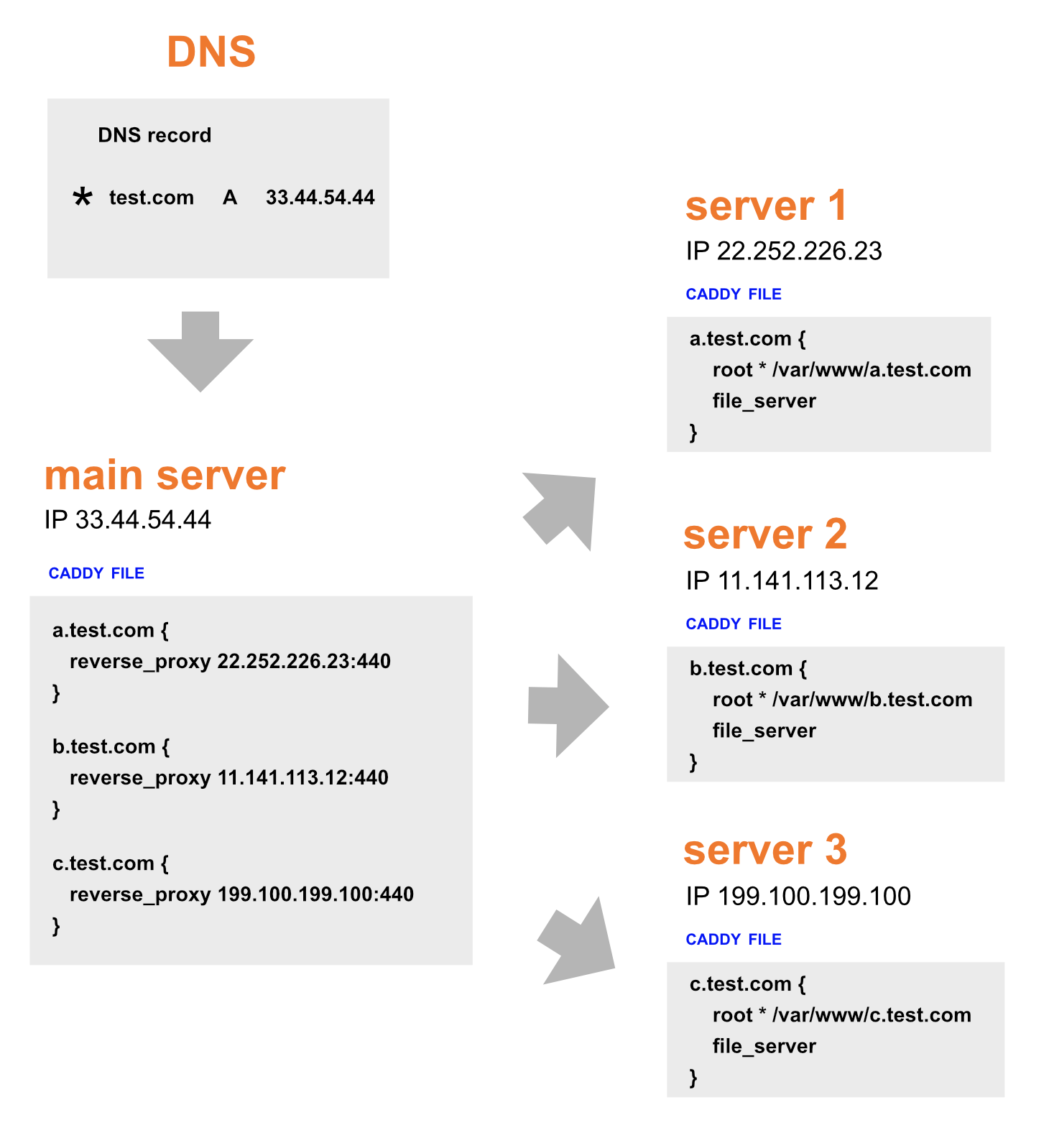
Main server is a reverse proxy, so if your DNS points to the main server then all the traffic goes through the main server.

thank you!