1. The problem I’m having:
I am pre-compressing files with gzip in order to avoid Caddy having to compress the files on-the-fly. Caddy is loaded with “precompressed gzip” and this usually works great, but some files have issues. For example, favicon.ico will not appear in the icon tab, but it is clearly received by the browser.
I did some testing with not pre-compressing files and instead allow Caddy to compress on-the-fly with “encode gzip”.
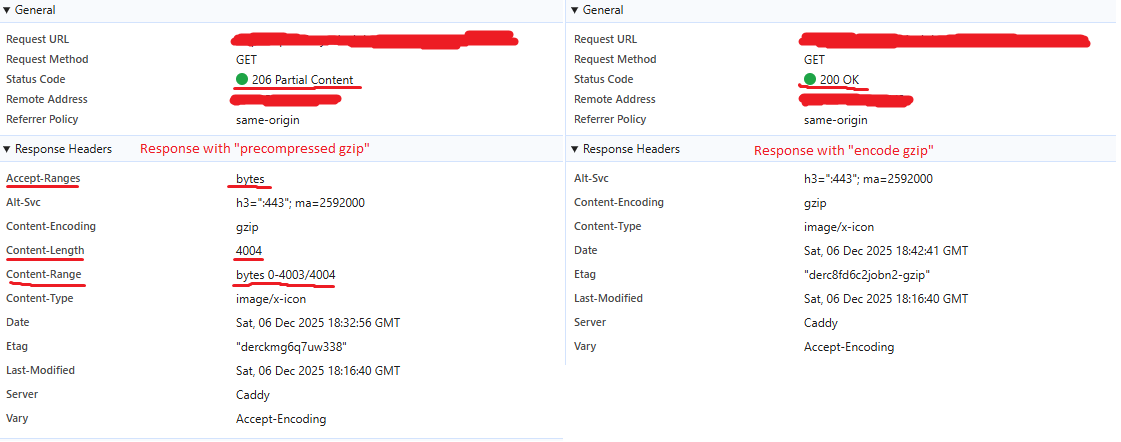
What I noticed is when Caddy compresses them on the fly the previously broken favicon works. Checking the responses in Chrome dev tools shows an interesting difference between the pre-compressed and on-fly-compression.
It seems responses using “precompressed gzip” respond with a partial status code with Content-Length and Content-Range set, but “encode gzip” does not.
Below I have an image comparing the two responses for the favicon.ico, but all requests do this.
I suspect favicon needs the response to be code 200, and I am now worried more issues will start to appear if I continue to use precompression.
So, why is the Content-Length and Content-Range set for only precompressed files? The requests are exactly the same for both responses.
2. Error messages and/or full log output:
No Log
3. Caddy version:
2.10.2
4. How I installed and ran Caddy:
Docker compose
a. System environment:
Docker
b. Command:
N/A
c. Service/unit/compose file:
services:
  caddy-quant:
    container_name: quantcaddy
    image: caddy:2.10.2
    restart: unless-stopped
    ports:
      - '80:80'
      - '443:443'
    volumes:
      - ./caddy-config:/config
      - ./caddy-data:/data
      - ./Caddyfile:/etc/caddy/Caddyfile
      - ./static:/usr/share/caddy/static
My complete Caddy config:
localhost:9000 {
    root * /usr/share/caddy
    file_server {
        precompressed gzip
    }

    #encode gzip

    @notStatic {
        not path /static/*
    }

    reverse_proxy @notStatic host.docker.internal:8000
}
5. Links to relevant resources:
None