Hi everyone,
I’ve been working on a Caddy (v2.10.0) setup for OAuth2 authentication using OAuth2 Proxy as middleware and a self-hosted OIDC provider (like Pocket ID for group claims). I couldn’t find many complete, working examples online, so after some trial-and-error, I built this. I’m sharing a genericized and simplified version focused on the auth side to help others get started. This works well with Caddy v2+ and could integrate with v3’s new config tools for validation.
This template uses Caddy snippets for reusability: cookie checks, forward auth to OAuth2 Proxy, group verification via headers, and error handling. It assumes you’re running OAuth2 Proxy separately and configured to pass group info in the X-Auth-Request-Groups header.
Key Features
- Redirects unauthenticated users to OAuth2 Proxy sign-in.
- Forward auth validates sessions and groups.
- Regex-based group checks (case-insensitive) for role-based access.
- Custom error responses and handling.
- Examples for group-protected sites and a special case with public paths.
Genericized Caddyfile
# Core Auth Snippets

(auth_error_handler) {
	handle_errors {
		@unauthenticated expression `{http.error.status_code} == 401`
		redir @unauthenticated https://{oauth_proxy_host}/oauth2/sign_in?rd=https://{host}{uri} 302
		respond "Service is currently unavailable. Please try again later." 503
	}
}

(auth_cookie_check) {
	@noauth not header Cookie *_oauth2_proxy=*
	redir @noauth https://{oauth_proxy_host}/oauth2/sign_in?rd=https://{host}{uri} 302
}

(auth_forward) {
	forward_auth {oauth_proxy_host:port} {
		uri /oauth2/auth
		copy_headers X-Auth-Request-Groups
		header_up X-Auth-Request-Redirect https://{host}{uri}
	}
}

(auth_group_check) {
	@no_groups not header X-Auth-Request-Groups *
	respond @no_groups "Access denied: No group membership found." 403
	@allowed header_regexp X-Auth-Request-Groups (?i)\b{args[0]}\b
}

(auth_deny_response) {
	respond "Access denied: You must be in the '{args[0]}' group." 403
}

(simple_error_handler) {
	handle_errors {
		respond "Something went wrong." 500
	}
}

# OAuth2 Proxy Itself (Unauthenticated, as it's the auth entrypoint)
{oauth_proxy_domain} {
	reverse_proxy {oauth_proxy_internal_url}  # e.g., http://localhost:4180
	import simple_error_handler
}

# Example: Protected Site for "infra" Group
infra-example.{your_domain} {
	import auth_error_handler
	import auth_cookie_check
	import auth_forward
	import auth_group_check infra
	handle @allowed {
		reverse_proxy {protected_service_url}  # e.g., https://internal-service:8006
	}
	import auth_deny_response infra
	import simple_error_handler
}

# Example: Protected Site for "all_team" Group
team-example.{your_domain} {
	import auth_error_handler
	import auth_cookie_check
	import auth_forward
	import auth_group_check all_team
	handle @allowed {
		reverse_proxy {protected_service_url}  # e.g., http://internal-service:9182
	}
	import auth_deny_response all_team
	import simple_error_handler
}

# Example: Protected Site with Custom Path Handling (e.g., Public FAQ with Auth Fallback)
special-example.{your_domain} {
	import auth_error_handler
	route {
		@public_path path /public/api/path  # Adjust to your public paths
		handle @public_path {
			reverse_proxy {public_service_url}  # Allow unauth access to specific paths
		}
		import auth_cookie_check
		import auth_forward
		import auth_group_check restricted_group
		handle @allowed {
			reverse_proxy {protected_service_url}
		}
		import auth_deny_response restricted_group
	}
	import simple_error_handler
}
How the Snippets Are Applied
To make this clearer, here’s a breakdown of how the snippets are applied in the “infra-example.{your_domain}” site configuration. This modular approach lets you reuse auth logic across multiple sites without repetition.
-
Import Error Handling (
import auth_error_handler): This catches auth-related errors (e.g., 401 from failed forward auth) and redirects to sign-in or shows a 503 for other issues, preventing users from seeing raw errors. -
Check for Auth Cookie (
import auth_cookie_check): If no OAuth2 cookie is present, redirect to the sign-in page. This is the first gatekeeper. -
Forward Auth to OAuth2 Proxy (
import auth_forward): Sends a subrequest to OAuth2 Proxy’s/oauth2/authendpoint. It copies group headers back and sets the redirect URI, allowing the proxy to validate the session and enrich the request with user groups. -
Group Check (
import auth_group_check infra): Uses the passed group argument (“infra”) to define matchers. It checks if groups exist (deny if not) and if the regex matches the required group (case-insensitive). The@allowedmatcher triggers the next handle. -
Handle Allowed Requests (
handle @allowed { reverse_proxy ... }): If groups match, proxy to the upstream service. Customize the reverse_proxy with your service URL, transports, etc. -
Deny Response (
import auth_deny_response infra): If not allowed, show a custom 403 message with the group name. -
Simple Error Handler (
import simple_error_handler): Fallback for non-auth errors, like upstream failures.
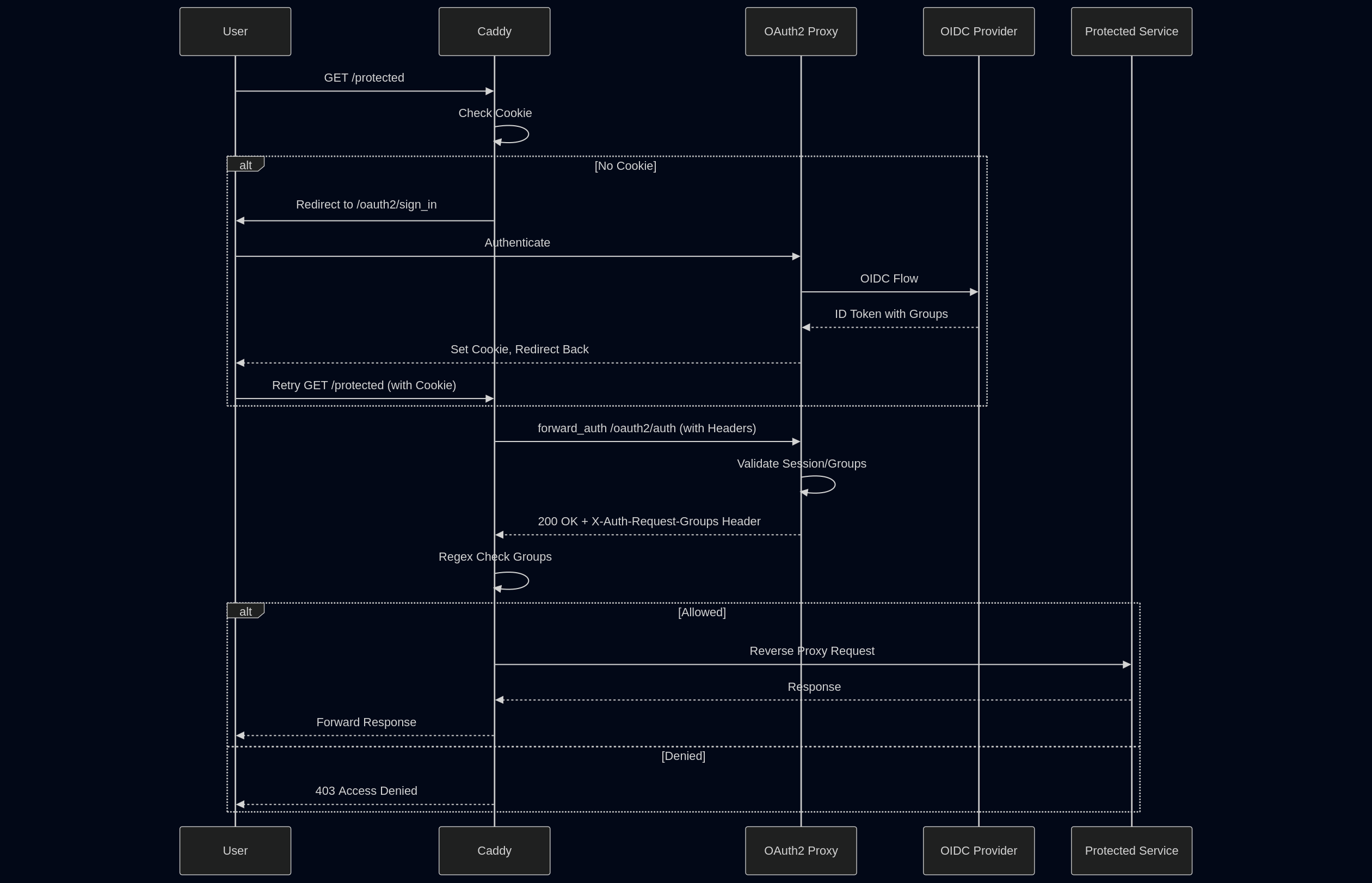
This structure ensures a consistent auth flow: cookie check → forward auth → group verify → proxy or deny. For the other examples, it’s similar—team-example uses “all_team” group, and special-example adds route-based public paths before applying auth.
Quick Explanation
- Auth Flow: No cookie? Redirect to sign-in. Forward auth to OAuth2 Proxy, which validates and adds group headers. Check groups with regex—if matched, proxy to the service; else, deny.
- Customization: Replace placeholders (e.g.,
{oauth_proxy_host:port}). For self-signed upstreams, addtransport http { tls_insecure_skip_verify }. Configure OAuth2 Proxy to fetch groups from your OIDC provider. - Pitfalls from My Experience: Watch for redirect loops (ensure cookie domains match), verify group headers in OIDC claims, and test incrementally.
Diagram for Visualization
Here is diagrams to illustrate the flow.
Sequence Diagram for Forward Auth:
I’ve also put this in a GitHub repo for easier forking: Caddy OAuth2 Proxy Authentication Template with Group Checks. Feedback, improvements, or questions welcome.
