anlexN
December 22, 2025, 1:32am
1
I can not use http://172.18.212.225:9999
This site can’t be reached
2.6.2
$ sudo -E caddy reverse-proxy --from http://172.18.212.225:9999 --to http://localhost:8888 --change-host-header --insecure
2025/12/22 01:17:59.828 WARN    admin   admin endpoint disabled
2025/12/22 01:17:59.829 INFO    http    enabling automatic HTTP->HTTPS redirects        {"server_name": "proxy"}
2025/12/22 01:17:59.829 INFO    tls.cache.maintenance   started background certificate maintenance      {"cache": "0xc000372770"}
2025/12/22 01:17:59.902 INFO    pki.ca.local    root certificate is already trusted by system   {"path": "storage:pki/authorities/local/root.crt"}
2025/12/22 01:17:59.903 INFO    http    enabling HTTP/3 listener        {"addr": ":9999"}
2025/12/22 01:17:59.903 INFO    connection doesn't allow setting of send buffer size. Not a *net.UDPConn?. See https://github.com/quic-go/quic-go/wiki/UDP-Buffer-Sizes for details.
2025/12/22 01:17:59.903 INFO    http.log        server running  {"name": "proxy", "protocols": ["h1", "h2", "h3"]}
2025/12/22 01:17:59.904 INFO    http.log        server running  {"name": "remaining_auto_https_redirects", "protocols": ["h1", "h2", "h3"]}
2025/12/22 01:17:59.904 INFO    http    enabling automatic TLS certificate management   {"domains": ["172.18.212.225"]}
2025/12/22 01:17:59.905 WARN    tls     stapling OCSP   {"error": "no OCSP stapling for [172.18.212.225]: no OCSP server specified in certificate", "identifiers": ["172.18.212.225"]}
Caddy proxying http://172.18.212.225:9999 -> localhost:8888
2025/12/22 01:17:59.906 INFO    tls     cleaning storage unit   {"description": "FileStorage:/home/anlexn/.local/share/caddy"}
2025/12/22 01:17:59.908 INFO    tls     finished cleaning storage units
Debian 13
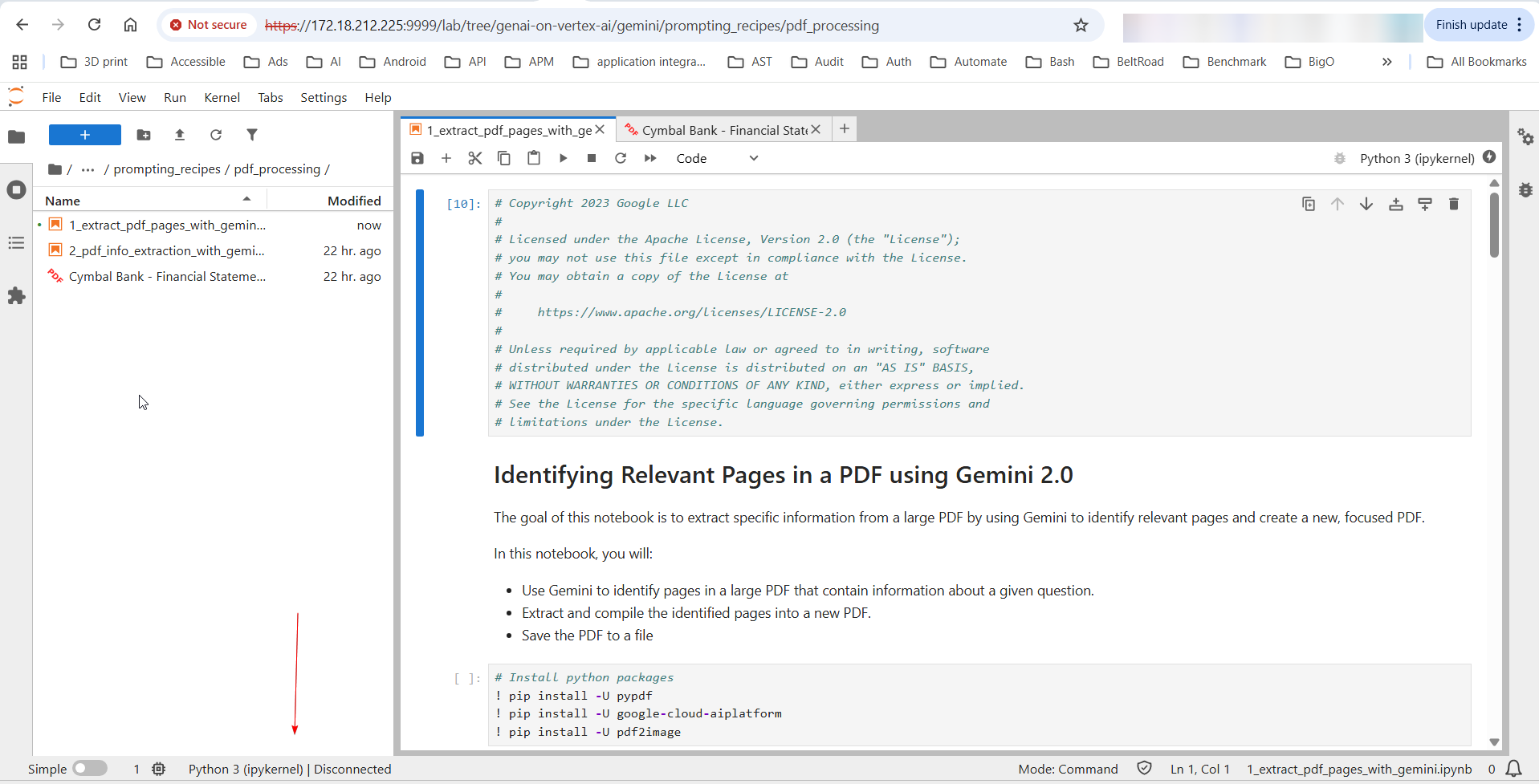
But I must use https://172.18.212.225:9999 to open. http don’t work. Is it a bug?
Mohammed90
December 22, 2025, 6:30am
2
You deleted half the template. We can’t analyze nor help without the full details. The best I can say is that your configuration is wrong, but you didn’t share it.
anlexN
December 22, 2025, 8:52am
3
@Mohammed90 Thank you for your reply, you are my friend!
Which configuration?
Mohammed90
December 22, 2025, 10:16am
4
Caddy configuration. Please fill out the template in full.
anlexN
December 22, 2025, 11:41am
5
I don’t use Caddy configuration, I just use caddy command.
How to solve?
Mohammed90
December 22, 2025, 11:13pm
6
I see now you’re using the command reverse-proxy. I’m not able to reproduce the problem. Let’s try first with upgrading to latest version. Debian ship 2.6.2, which was released in the stone age. Use our apt repository to get the latest version.
anlexN
December 23, 2025, 1:19am
7
Thank you for your reply, you are my friend!
the latest version solve my http problm.
But Python 3 (ipykernel) can not be connected so that all cells can not run. How to solve?
Can you give me your email? I want to add you to my contacts.
You can try and try:
In the windows WSL2:
pip install jupyterlab
jupyter lab
In the windows chrome or firefox, open url like http://172.18.212.225:9999/lab?token=ff06979fd3cd605432c2bfd7aaf2c4ef6f15a85b7bd32509
Mohammed90
December 23, 2025, 8:56am
8
This is not a Caddy problem, unless you show evidence from logs and browser requests/response of Caddy issue.
anlexN
December 23, 2025, 9:22am
9
This is jupyter lab log:
[W 2025-12-23 04:30:14.402 ServerApp] Replacing stale connection: 2616e9d7-0e5a-4b7f-8c06-f8cdd799c8bc:abc6d01e-1163-401f-a993-f5443ca72023
[W 2025-12-23 04:30:14.405 ServerApp] Blocking Cross Origin WebSocket Attempt.  Origin: http://172.18.212.225:9999, Host: localhost:8888
[W 2025-12-23 04:30:14.406 ServerApp] 403 GET /api/kernels/2616e9d7-0e5a-4b7f-8c06-f8cdd799c8bc/channels?session_id=abc6d01e-1163-401f-a993-f5443ca72023 (7258f85947224de78f493146d4668e77@127.0.0.1) 9.23ms referer=None
[W 2025-12-23 04:30:15.765 ServerApp] Replacing stale connection: 2616e9d7-0e5a-4b7f-8c06-f8cdd799c8bc:262cd1d9-9690-401e-bb24-944caf6918a1
[W 2025-12-23 04:30:15.766 ServerApp] Blocking Cross Origin WebSocket Attempt.  Origin: http://172.18.212.225:9999, Host: localhost:8888
[W 2025-12-23 04:30:15.766 ServerApp] 403 GET /api/kernels/2616e9d7-0e5a-4b7f-8c06-f8cdd799c8bc/channels?session_id=262cd1d9-9690-401e-bb24-944caf6918a1 (6ec6d522cf36418a9507bacd8cbc160d@127.0.0.1) 2.12ms referer=None
[W 2025-12-23 04:30:34.557 ServerApp] Replacing stale connection: 2616e9d7-0e5a-4b7f-8c06-f8cdd799c8bc:e1ad9011-1c15-4eed-81c0-e592c0fb96e8
[W 2025-12-23 04:30:34.559 ServerApp] Blocking Cross Origin WebSocket Attempt.  Origin: http://172.18.212.225:9999, Host: localhost:8888
[W 2025-12-23 04:30:34.561 ServerApp] 403 GET /api/kernels/2616e9d7-0e5a-4b7f-8c06-f8cdd799c8bc/channels?session_id=e1ad9011-1c15-4eed-81c0-e592c0fb96e8 (6ec6d522cf36418a9507bacd8cbc160d@127.0.0.1) 7.99ms referer=None
[W 2025-12-23 04:31:03.027 ServerApp] Replacing stale connection: 2616e9d7-0e5a-4b7f-8c06-f8cdd799c8bc:262cd1d9-9690-401e-bb24-944caf6918a1
[W 2025-12-23 04:31:03.027 ServerApp] Blocking Cross Origin WebSocket Attempt.  Origin: http://172.18.212.225:9999, Host: localhost:8888
[W 2025-12-23 04:31:03.028 ServerApp] 403 GET /api/kernels/2616e9d7-0e5a-4b7f-8c06-f8cdd799c8bc/channels?session_id=262cd1d9-9690-401e-bb24-944caf6918a1 (6ec6d522cf36418a9507bacd8cbc160d@127.0.0.1) 2.51ms referer=None
[W 2025-12-23 04:31:45.052 ServerApp] Replacing stale connection: 2616e9d7-0e5a-4b7f-8c06-f8cdd799c8bc:e1ad9011-1c15-4eed-81c0-e592c0fb96e8
[W 2025-12-23 04:31:45.053 ServerApp] Blocking Cross Origin WebSocket Attempt.  Origin: http://172.18.212.225:9999, Host: localhost:8888
[W 2025-12-23 04:31:45.055 ServerApp] 403 GET /api/kernels/2616e9d7-0e5a-4b7f-8c06-f8cdd799c8bc/channels?session_id=e1ad9011-1c15-4eed-81c0-e592c0fb96e8 (6ec6d522cf36418a9507bacd8cbc160d@127.0.0.1) 7.25ms referer=None
[W 2025-12-23 04:32:45.751 ServerApp] Replacing stale connection: 2616e9d7-0e5a-4b7f-8c06-f8cdd799c8bc:262cd1d9-9690-401e-bb24-944caf6918a1
[W 2025-12-23 04:32:45.753 ServerApp] Blocking Cross Origin WebSocket Attempt.  Origin: http://172.18.212.225:9999, Host: localhost:8888
[W 2025-12-23 04:32:45.754 ServerApp] 403 GET /api/kernels/2616e9d7-0e5a-4b7f-8c06-f8cdd799c8bc/channels?session_id=262cd1d9-9690-401e-bb24-944caf6918a1 (6ec6d522cf36418a9507bacd8cbc160d@127.0.0.1) 7.21ms referer=None
OK, I should sudo -E caddy reverse-proxy --from http://172.18.212.225:9999 --to http://localhost:8888 --header-up "Origin: http://localhost:8888" --change-host-header --insecure.
This case is solved by you and me. @Mohammed90 Thank you too. You are my friend!
Can you give me your email? I want to add you to my contact.
1 Like
system
January 22, 2026, 9:23am
10
This topic was automatically closed 30 days after the last reply. New replies are no longer allowed.