1. The problem I’m having:
I cant seem to get my caddy config fully working for livekit. This is the caddy config im trying to use. Its a test server that i frequently reinstall to test install scripts etc but i cant seem to get this caddy x livekit part to work
dev0002.network-z.com {

        reverse_proxy * http://localhost:7880 {
                transport http {
                        versions h1
                }

                header_up Host {host}
                header_up Connection {>Connection}
                header_up Upgrade {>Upgrade}
                header_up X-Real-IP {remote}
                header_up X-Forwarded-For {remote}
                header_up X-Forwarded-Proto {scheme}

                header_down Access-Control-Allow-Origin *
                header_down Access-Control-Allow-Methods "GET, POST, OPTIONS"
                header_down Access-Control-Allow-Headers *
                header_down Access-Control-Allow-Credentials true
        }
}
This is my livekit config:
keys:
  dev: Minimum32CharacterLongKeyForSecurity

turn:
  enabled: true
  domain: dev0002.network-z.com
  tls_port: 5349
  udp_port: 3478
  cert_file: /etc/letsencrypt/live/dev0002.network-z.com/cert.pem
  key_file: /etc/letsencrypt/live/dev0002.network-z.com/privkey.pem
This is the nginx config i used on my old server that worked, but im trying to use caddy now, but i thought it may help:
location / {
	proxy_pass http://127.0.0.1:7880/;
	proxy_http_version 1.1;

	add_header Access-Control-Allow-Origin *;
	add_header Access-Control-Allow-Methods "GET, POST, OPTIONS";
	add_header Access-Control-Allow-Headers "*";

	proxy_set_header Upgrade $http_upgrade;
	proxy_set_header Connection "upgrade";
	proxy_set_header Host $host;
	proxy_set_header X-Real-IP $remote_addr;
	proxy_set_header X-Forwarded-For $proxy_add_x_forwarded_for;
	proxy_set_header X-Forwarded-Proto $scheme;
}
2. Error messages and/or full log output:
It seems like accessing dev0002.network-z.com works but dev0002.network-z.com/rtc fails all the time
root@kvm1018:/home/dcts/instances/testserver1# curl -i -H "Connection: Upgrade" -H "Upgrade: websocket" https://dev0002.network-z.com/rtc
HTTP/2 404
access-control-allow-headers: *
access-control-allow-methods: GET, POST, OPTIONS
access-control-allow-origin: *
alt-svc: h3=":443"; ma=2592000
date: Thu, 27 Nov 2025 22:34:00 GMT
server: Caddy
vary: Origin
content-length: 0

root@kvm1018:/home/dcts/instances/testserver1# curl -i -H "Connection: Upgrade" -H "Upgrade: websocket" https://dev0002.network-z.com
HTTP/2 200
access-control-allow-headers: *
access-control-allow-methods: GET, POST, OPTIONS
access-control-allow-origin: *
alt-svc: h3=":443"; ma=2592000
content-type: text/plain; charset=utf-8
date: Thu, 27 Nov 2025 22:34:05 GMT
server: Caddy
vary: Origin
content-length: 2
I also get these errors inside the web app:
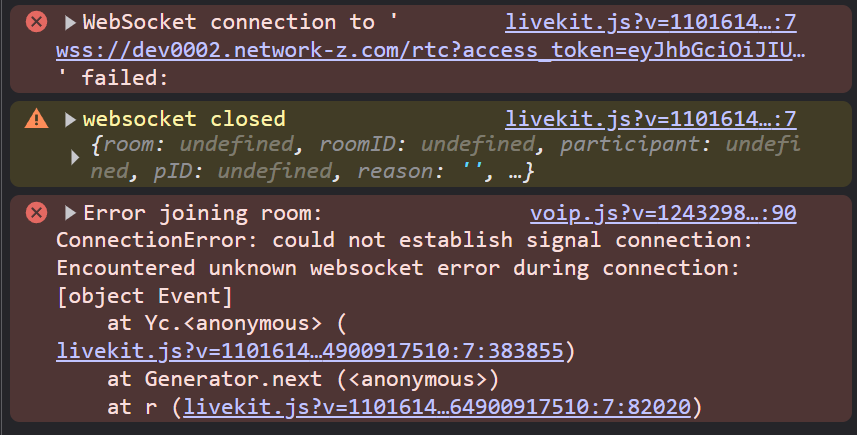
livekit.js?v=11016145064900917510:7 WebSocket connection to 'wss://dev0002.network-z.com/rtc?access_token=eyJhbGciOiJIUzI1NiJ9.eyJ2aWRlbyI6eyJyb29tSm9pbiI6dHJ1ZSwicm9vbSI6IjExNDIifSwiaXNzIjoiZGV2IiwiZXhwIjoxNzY0MzA0NzQ4LCJuYmYiOjAsInN1YiI6IjEzMTM4MTY1ODY2NyJ9.J91LD-5iw_aESUyxLVNznzI4FVklyodPdB3jVC6iXXs&auto_subscribe=1&sdk=js&version=2.15.14&protocol=16' failed:
ca @ livekit.js?v=11016145064900917510:7
(anonymous) @ livekit.js?v=11016145064900917510:7
(anonymous) @ livekit.js?v=11016145064900917510:7
Fi @ livekit.js?v=11016145064900917510:7
(anonymous) @ livekit.js?v=11016145064900917510:7
(anonymous) @ livekit.js?v=11016145064900917510:7
r @ livekit.js?v=11016145064900917510:7
livekit.js?v=11016145064900917510:7 websocket closed {room: undefined, roomID: undefined, participant: undefined, pID: undefined, reason: '', …}
(anonymous) @ livekit.js?v=11016145064900917510:7
Promise.then
(anonymous) @ livekit.js?v=11016145064900917510:7
(anonymous) @ livekit.js?v=11016145064900917510:7
Fi @ livekit.js?v=11016145064900917510:7
(anonymous) @ livekit.js?v=11016145064900917510:7
(anonymous) @ livekit.js?v=11016145064900917510:7
r @ livekit.js?v=11016145064900917510:7
Promise.then
c @ livekit.js?v=11016145064900917510:7
(anonymous) @ livekit.js?v=11016145064900917510:7
Fi @ livekit.js?v=11016145064900917510:7
connect @ livekit.js?v=11016145064900917510:7
(anonymous) @ livekit.js?v=11016145064900917510:7
(anonymous) @ livekit.js?v=11016145064900917510:7
Fi @ livekit.js?v=11016145064900917510:7
join @ livekit.js?v=11016145064900917510:7
(anonymous) @ livekit.js?v=11016145064900917510:7
(anonymous) @ livekit.js?v=11016145064900917510:7
Fi @ livekit.js?v=11016145064900917510:7
join @ livekit.js?v=11016145064900917510:7
(anonymous) @ livekit.js?v=11016145064900917510:7
(anonymous) @ livekit.js?v=11016145064900917510:7
Fi @ livekit.js?v=11016145064900917510:7
Yc.connectSignal @ livekit.js?v=11016145064900917510:7
(anonymous) @ livekit.js?v=11016145064900917510:7
(anonymous) @ livekit.js?v=11016145064900917510:7
Fi @ livekit.js?v=11016145064900917510:7
Yc.attemptConnection @ livekit.js?v=11016145064900917510:7
(anonymous) @ livekit.js?v=11016145064900917510:7
(anonymous) @ livekit.js?v=11016145064900917510:7
Fi @ livekit.js?v=11016145064900917510:7
r @ livekit.js?v=11016145064900917510:7
(anonymous) @ livekit.js?v=11016145064900917510:7
(anonymous) @ livekit.js?v=11016145064900917510:7
(anonymous) @ livekit.js?v=11016145064900917510:7
Fi @ livekit.js?v=11016145064900917510:7
(anonymous) @ livekit.js?v=11016145064900917510:7
Ir @ livekit.js?v=11016145064900917510:7
(anonymous) @ livekit.js?v=11016145064900917510:7
r @ livekit.js?v=11016145064900917510:7
Promise.then
c @ livekit.js?v=11016145064900917510:7
(anonymous) @ livekit.js?v=11016145064900917510:7
Fi @ livekit.js?v=11016145064900917510:7
Yc.connect @ livekit.js?v=11016145064900917510:7
joinRoom @ voip.js?v=12432988549523802090:81
await in joinRoom
setupVC @ vc-handler.js?v=19051490886444384069:407
(anonymous) @ chat.js?v=18315577987827629411:2264
onack @ socket.io.js:1204
onpacket @ socket.io.js:1094
./node_modules/component-emitter/index.js.Emitter.emit @ socket.io.js:1761
ondecoded @ socket.io.js:526
./node_modules/component-emitter/index.js.Emitter.emit @ socket.io.js:1761
add @ socket.io.js:5500
ondata @ socket.io.js:515
./node_modules/component-emitter/index.js.Emitter.emit @ socket.io.js:1761
onPacket @ socket.io.js:2713
(anonymous) @ socket.io.js:2533
./node_modules/component-emitter/index.js.Emitter.emit @ socket.io.js:1761
onPacket @ socket.io.js:3160
onData @ socket.io.js:3151
ws.onmessage @ socket.io.js:4333
voip.js?v=12432988549523802090:90 Error joining room: ConnectionError: could not establish signal connection: Encountered unknown websocket error during connection: [object Event]
    at Yc.<anonymous> (livekit.js?v=11016145064900917510:7:383855)
    at Generator.next (<anonymous>)
    at r (livekit.js?v=11016145064900917510:7:82020)
3. Caddy version:
2.6.2
4. How I installed and ran Caddy:
apt install caddy
a. System environment:
No LSB modules are available.
Distributor ID: Debian
Description: Debian GNU/Linux 13 (trixie)
Release: 13
Codename: trixie
b. Command:
nano /etc/caddy/Caddyfile
systemctl reload caddy
caddy adapt --config /etc/caddy/Caddyfile
caddy reload --config /etc/caddy/Caddyfile --adapter caddyfile
caddy validate --config /etc/caddy/Caddyfile