1. The problem I’m having:
Hi, I’m trying to have Caddy reverse proxy local services such as pihole and homepage with my purchased domain, extraicx. com.
I am consistently running into caddy debug messages such as “could not get certificate from issuer” and “no matching certificates and no custom selection logic” while attempting to connect to, pihole.extraicx.com with DNS challenge.
If I remove the acme_dns line in the caddy config, I can get the reverse proxy to work, however, my remote_ip from devices inside the local network are shown as my public IP instead of the local device IP. This means I can’t do something like “not remote_ip <local_ips>” to filter services I don’t want access to from the 80/435 open ports. If there’s an alternative to this issue outside of using the acme_dns challenge, please let me know!
2. Error messages and/or full log output:
caddy  | 2026-02-17T20:39:52.760496859Z {"level":"debug","ts":1771360792.7603152,"msg":"http request","method":"POST","url":"https://acme-v02.api.letsencrypt.org/acme/authz/3073941036/660268947216","headers":{"Content-Type":["application/jose+json"],"User-Agent":["Caddy/2.10.2 CertMagic acmez (linux; amd64)"]},"response_headers":{"Boulder-Requester":["3073941036"],"Cache-Control":["public, max-age=0, no-cache"],"Content-Length":["827"],"Content-Type":["application/json"],"Date":["Tue, 17 Feb 2026 20:39:52 GMT"],"Link":[";rel=\"index\""],"Replay-Nonce":["NeKnt8TGPpe8kNbd-uY3FNVznIHgUKHgEV7jO6Tjb6hK__x-Xyw"],"Server":["nginx"],"Strict-Transport-Security":["max-age=604800"],"X-Frame-Options":["DENY"]},"status_code":200}
caddy  | 2026-02-17T20:39:52.760645009Z {"level":"info","ts":1771360792.7605124,"msg":"trying to solve challenge","identifier":"pihole.extraicx.com","challenge_type":"dns-01","ca":"https://acme-v02.api.letsencrypt.org/directory"}
caddy  | 2026-02-17T20:40:03.204866836Z {"level":"debug","ts":1771360803.204665,"msg":"waiting for solver before continuing","identifier":"whoami.extraicx.com","challenge_type":"dns-01"}
caddy  | 2026-02-17T20:40:03.449791811Z {"level":"debug","ts":1771360803.4496248,"msg":"waiting for solver before continuing","identifier":"pihole.extraicx.com","challenge_type":"dns-01"}
caddy  | 2026-02-17T20:42:03.492401436Z {"level":"debug","ts":1771360923.492143,"msg":"done waiting for solver","identifier":"whoami.extraicx.com","challenge_type":"dns-01"}
caddy  | 2026-02-17T20:42:03.937721462Z {"level":"debug","ts":1771360923.9375186,"msg":"http request","method":"POST","url":"https://acme-v02.api.letsencrypt.org/acme/authz/3073941036/660268947096","headers":{"Content-Type":["application/jose+json"],"User-Agent":["Caddy/2.10.2 CertMagic acmez (linux; amd64)"]},"response_headers":{"Boulder-Requester":["3073941036"],"Cache-Control":["public, max-age=0, no-cache"],"Content-Length":["831"],"Content-Type":["application/json"],"Date":["Tue, 17 Feb 2026 20:42:03 GMT"],"Link":[";rel=\"index\""],"Replay-Nonce":["NeKnt8TGNn5Gr_Po2nZCEfTolDnsti4K4EGNzCDh1FFB_yapP2Y"],"Server":["nginx"],"Strict-Transport-Security":["max-age=604800"],"X-Frame-Options":["DENY"]},"status_code":200}
caddy  | 2026-02-17T20:42:03.937839843Z {"level":"error","ts":1771360923.9377627,"logger":"tls.obtain","msg":"could not get certificate from issuer","identifier":"whoami.extraicx.com","issuer":"acme-v02.api.letsencrypt.org-directory","error":"[whoami.extraicx.com] solving challenges: waiting for solver certmagic.solverWrapper to be ready: timed out waiting for record to fully propagate; verify DNS provider configuration is correct - last error:  (order=https://acme-v02.api.letsencrypt.org/acme/order/3073941036/481422291226) (ca=https://acme-v02.api.letsencrypt.org/directory)"}
caddy  | 2026-02-17T20:42:03.937905010Z {"level":"debug","ts":1771360923.937806,"logger":"events","msg":"event","name":"cert_failed","id":"d59d90aa-feab-4402-bd11-ff6341313d98","origin":"tls","data":{"error":{},"identifier":"whoami.extraicx.com","issuers":["acme-v02.api.letsencrypt.org-directory"],"renewal":false}}


caddy  | 2026-02-17T20:42:38.181841963Z {"level":"debug","ts":1771360958.1816108,"logger":"events","msg":"event","name":"tls_get_certificate","id":"ae545195-9e2d-4f35-bb74-874e32150830","origin":"tls","data":{"client_hello":{"CipherSuites":[31354,4865,4866,4867,49195,49199,49196,49200,52393,52392,49171,49172,156,157,47,53],"ServerName":"pihole.extraicx.com","SupportedCurves":[10794,4588,29,23,24],"SupportedPoints":"AA==","SignatureSchemes":[1027,2052,1025,1283,2053,1281,2054,1537],"SupportedProtos":["h2","http/1.1"],"SupportedVersions":[6682,772,771],"RemoteAddr":{"IP":"136.35.226.205","Port":57202,"Zone":""},"LocalAddr":{"IP":"192.168.1.102","Port":443,"Zone":""}}}}
caddy  | 2026-02-17T20:42:38.181909759Z {"level":"debug","ts":1771360958.1816921,"logger":"tls.handshake","msg":"no matching certificates and no custom selection logic","identifier":"pihole.extraicx.com"}
caddy  | 2026-02-17T20:42:38.181953401Z {"level":"debug","ts":1771360958.1817062,"logger":"tls.handshake","msg":"no matching certificates and no custom selection logic","identifier":"*.extraicx.com"}
caddy  | 2026-02-17T20:42:38.181981837Z {"level":"debug","ts":1771360958.1817155,"logger":"tls.handshake","msg":"no matching certificates and no custom selection logic","identifier":"*.*.com"}
caddy  | 2026-02-17T20:42:38.182002619Z {"level":"debug","ts":1771360958.181727,"logger":"tls.handshake","msg":"no matching certificates and no custom selection logic","identifier":"*.*.*"}
caddy  | 2026-02-17T20:42:38.182026233Z {"level":"debug","ts":1771360958.1817563,"logger":"tls.handshake","msg":"no certificate matching TLS ClientHello","remote_ip":"136.35.226.205","remote_port":"57202","server_name":"pihole.extraicx.com","remote":"136.35.226.205:57202","identifier":"pihole.extraicx.com","cipher_suites":[31354,4865,4866,4867,49195,49199,49196,49200,52393,52392,49171,49172,156,157,47,53],"cert_cache_fill":0,"load_or_obtain_if_necessary":true,"on_demand":false}
caddy  | 2026-02-17T20:42:38.182049767Z {"level":"debug","ts":1771360958.1818504,"logger":"http.stdlib","msg":"http: TLS handshake error from 136.35.226.205:57202: no certificate available for 'pihole.extraicx.com'"}
3. Caddy version:
v2.10.2 h1:g/gTYjGMD0dec+UgMw8SnfmJ3I9+M2TdvoRL/Ovu6U8=
4. How I installed and ran Caddy:
I built caddy-namesilo for docker with the following Dockerfile.
To use caddy-dns/namesilo, I used a fork of GitHub - caddy-dns/namesilo · GitHub that just updated the libdns version, because it’s outdated on the main caddy-dns/namesilo repo.
FROM caddy:builder AS builder

RUN caddy-builder \
    github.com/Sacmanxman2/caddy-namesilo

FROM caddy:latest

COPY --from=builder /usr/bin/caddy /usr/bin/caddy
a. System environment:
Running docker and dockerized services (caddy, pihole, whoami) on 192.168.1.102
Ubuntu 24.04.3 LTS
Docker version 29.2.1
b. Command:
c. Service/unit/compose file:
This is my compose file for whoami, caddy, pihole. Since I’ve set network_mode to host, the caddy_net network probably isn’t relevant, but I’m okay with setting the host IP and ports of the docker services if that means I can filter out ips using remote_ip.
192.168.1.102:8080 for Pihole and 192.168.1.102:8081 for Whoami work fine on another machine in the network.
volumes:
  caddy_data:
  caddy_config:

networks:
  caddy_net:
  driver: bridge
  name: caddy_net

services:
  whoami:
    image: "containous/whoami"
    container_name: "whoami"
    hostname: "whoami"
    networks:
      - caddy_net
    ports
      - 8081:80
  caddy:
    container_name: caddy
    image: "extraicx/caddy_dns_namesilo"
    build: Dockerfile
    restart: unless-stopped
    # networks:
    #   - caddy_net
    network_mode: host # host mode so caddy can see original ips and not the docker subnet ones
    # ports:
    #   - "80:80"
    #   - "443:443"
    #   - "443:443/udp"
    volumes:
      - ./caddy/config:/etc/caddy
      - ./caddy/site:/srv
      - ./logs:/var/log
      - caddy_data:/data
      - caddy_config:/config
  pihole:
    depends_on:
      - caddy
    container_name: pihole
    image: pihole/pihole:latest
    networks:
      - caddy_net
    ports:
      - "8080:80/tcp"
      # DNS Ports
      - "53:53/tcp"
      - "53:53/udp"
      # Default HTTP Port
      # - "80:80/tcp"
      # Default HTTPs Port. FTL will generate a self-signed certificate
      # - "443:443/tcp"
      # Uncomment the line below if you are using Pi-hole as your DHCP server
      #- "67:67/udp"
      # Uncomment the line below if you are using Pi-hole as your NTP server
      #- "123:123/udp"
    environment:
      # Set the appropriate timezone for your location (https://en.wikipedia.org/wiki/List_of_tz_database_time_zones), e.g:
      TZ: 'America/Chicago'
      # Set a password to access the web interface. Not setting one will result in a random password being assigned
      FTLCONF_webserver_api_password: '<redacted>'
      # If using Docker's default `bridge` network setting the dns listening mode should be set to 'ALL'
      FTLCONF_dns_listeningMode: 'ALL'
    # Volumes store your data between container upgrades
    volumes:
      # For persisting Pi-hole's databases and common configuration file
      - './pihole/config:/app/config'
      - ./logs:/var/log
      # Uncomment the below if you have custom dnsmasq config files that you want to persist. Not needed for most starting fresh with Pi-hole v6. If you're upgrading from v5 you and have used this directory before, you should keep it enabled for the first v6 container start to allow for a complete migration. It can be removed afterwards. Needs environment variable FTLCONF_misc_etc_dnsmasq_d: 'true'
      #- './etc-dnsmasq.d:/etc/dnsmasq.d'    cap_add:
      # See https://github.com/pi-hole/docker-pi-hole#note-on-capabilities
      # Required if you are using Pi-hole as your DHCP server, else not needed
      #- NET_ADMIN
      # Required if you are using Pi-hole as your NTP client to be able to set the host's system time
      #- SYS_TIME
      # Optional, if Pi-hole should get some more processing time      - SYS_NICE
    restart: unless-stopped
d. My complete Caddy config:
{
    debug
    acme_dns namesilo <redacted_api_key>
    auto_https prefer_wildcard
}

whoami.extraicx.com {
    reverse_proxy :8081
}

pihole.extraicx.com {
    reverse_proxy :8080
}
5. Links to relevant resources:
Ports 80 and 443 are forwarded to the host, 192.168.1.102
Namesilo DNS record:
Name: *, Type: A, IP: 136.35.226.205, TTL: 3600
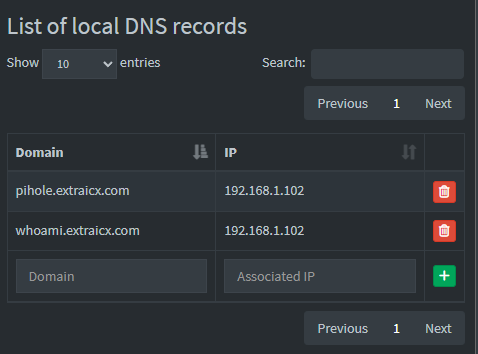
Pihole Local DNS records: